

TL;DR
A single AI agent handles tasks one at a time.
An agent team runs multiple agents simultaneously, each owning a lane, then merges their outputs.
I built one for a reader who spends about 45 minutes every day compiling timesheets from emails and work files.
Three agents. Twenty-nine seconds. Zero minutes of their time.
Here’s exactly how it works and how to set it up yourself.
PS: If you missed Part 1 and Part 2 of this Claude Code series, you can read No-BS Claude Code - Part 1: Tokens, Context Management & CLAUDE.md and No-BS Claude Code - Part 2: Subagents Explained
Merhaba👋🏻
I am a Software Engineer with 10+ years of experience. My goal is to close the gap between the technical and the non-technical, making AI accessible to everyone, regardless of their background.
One of my subscribers emailed me earlier:
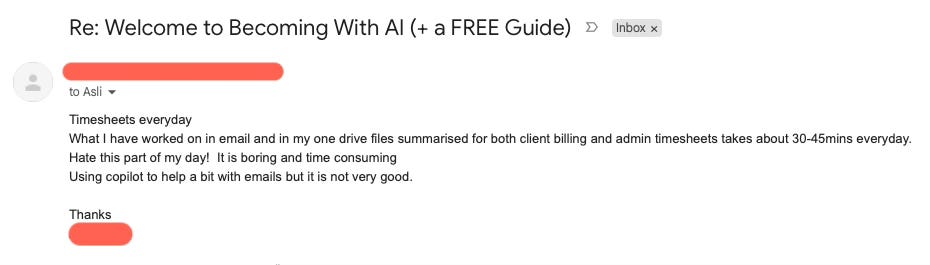
When I read this email, I immediately thought that this would be a perfect use case for my Claude Code Agent Teams article!
Not because it’s complex. Because it’s parallel. Their emails and their work notes have nothing to do with each other. They’re two completely independent sources of truth that need to be read, summarized, and merged into one output. There’s no reason to process one before the other.
And that distinction; sequential vs. parallel, is the whole point of this article.
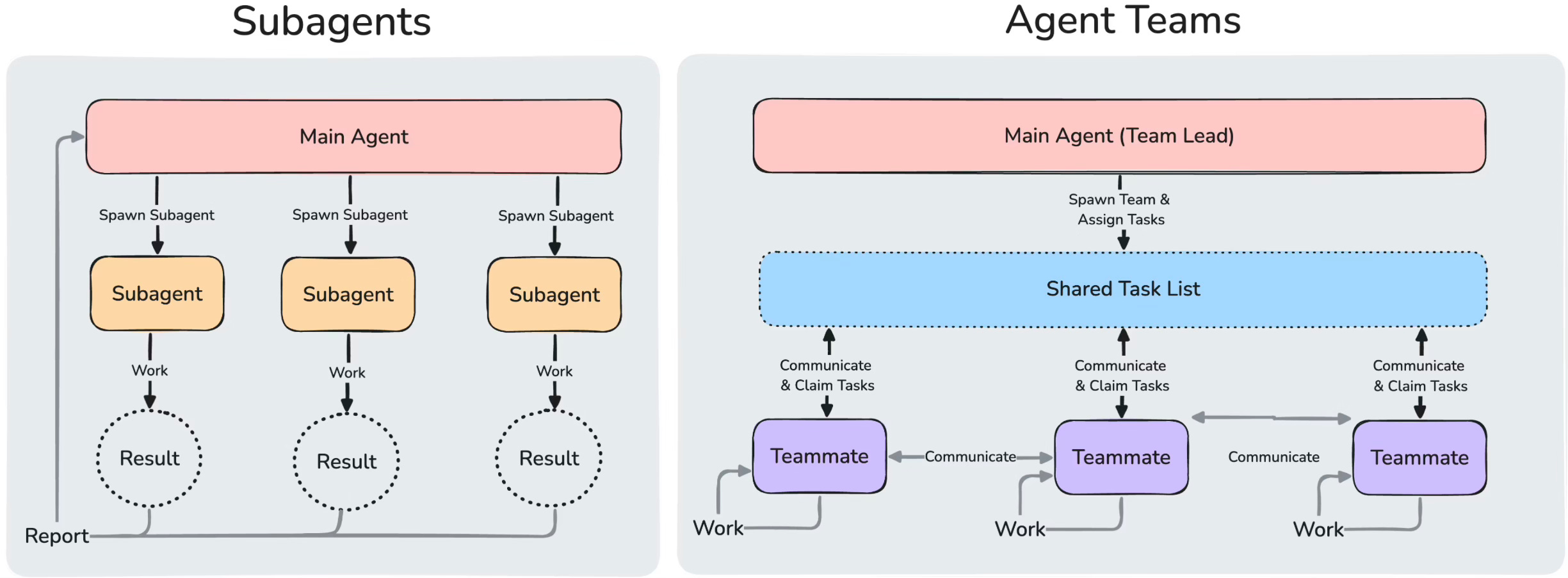
Claude Code Subagents vs Agent Teams: The Key Difference
If you’ve read Part 2 of this series, you already know subagents.
A subagent is a single AI agent that handles one task at a time. You can create many subagents with different set of skill set, and they report back to the main agent.

However, in Agent Teams, all of the agents can share a task list, work in dependently, and communicate with each other.
What Are Claude Code Agent Teams (And Why They're Faster)
Agent teams are multiple AI agents working in parallel, each owning a specific task, whose outputs are combined by an orchestrator to produce a result none of them could produce alone.
They are useful when a single AI isn’t enough; not because it lacks intelligence, but because it lacks time. Instead of one agent doing everything sequentially, a team of specialized agents works simultaneously. Each owns a lane. An orchestrator waits for all of them, then hands their combined output to the next stage. The magic isn’t in any individual agent. It’s in the handoff.
💡 Use subagents when you need to complete individual tasks, and use agent teams when you need your agents interact with other. Be aware that token costs are higher with agent teams, which means they are more expensive than subagents.
How to Enable Claude Code Agent Teams (Experimental Setup)
Agent teams are experimental feature and they are disabled by default. You need to enable them by setting CLAUDE_CODE_EXPERIMENTAL_AGENT_TEAMS to 1 in ~/.claude/settings.json file:
{
  "env": {
    "CLAUDE_CODE_EXPERIMENTAL_AGENT_TEAMS": "1"
  }
}
💡 I won’t go into more detail on how to enable agent teams, but you can take a look at Claude’s documentation for more details.
Real Use Case: Automate Daily Timesheets with 3 Parallel AI Agents
Let me bring this back to the real problem.
My subscriber had two separate worlds of data: their Inbox and their OneDrive.
In a traditional setup, an AI would tackle these like a human does: one after the other. It’s a bottleneck. There's no reason to read one before the other. A sequential agent would scan emails first, then scan files, then write the summary. An agent team reads both at the same time.
So I built three agents:
EmailReaderAgent
FileReaderAgent
WriterAgent
The two readers run in parallel. The writer only starts when both are done.
Total processing time: 29 seconds. My subscriber’s time: 0 minutes.
That’s 30–45 minutes of daily drudgery gone.
How the Three Agents Communicate and Hand Off Work
Before I show you how to set this up, let me explain how the three agents actually talk to each other. This is the part that makes agent teams different from just running three separate prompts.
The EmailReaderAgent: This agent gets one job. Scan today’s emails. Extract any mentions of tasks completed, client interactions, deliverables sent, meetings attended. Output a clean, structured list. Nothing more.
The FileReaderAgent: Same idea, different source. Scan recent files and work notes. Extract what was worked on, what was edited, what was created. Output a clean, structured list. Nothing more.
The WriterAgent: This is the “merger”. It receives the output from both readers and produces two things: a client billing summary (grouped by client, with time estimates) and an admin timesheet (lists all work entries).
Step-by-Step: Build Your First Claude Code Agent Team
Step 1: Create folders and files
We will start by creating folders and files to kick off this demo.
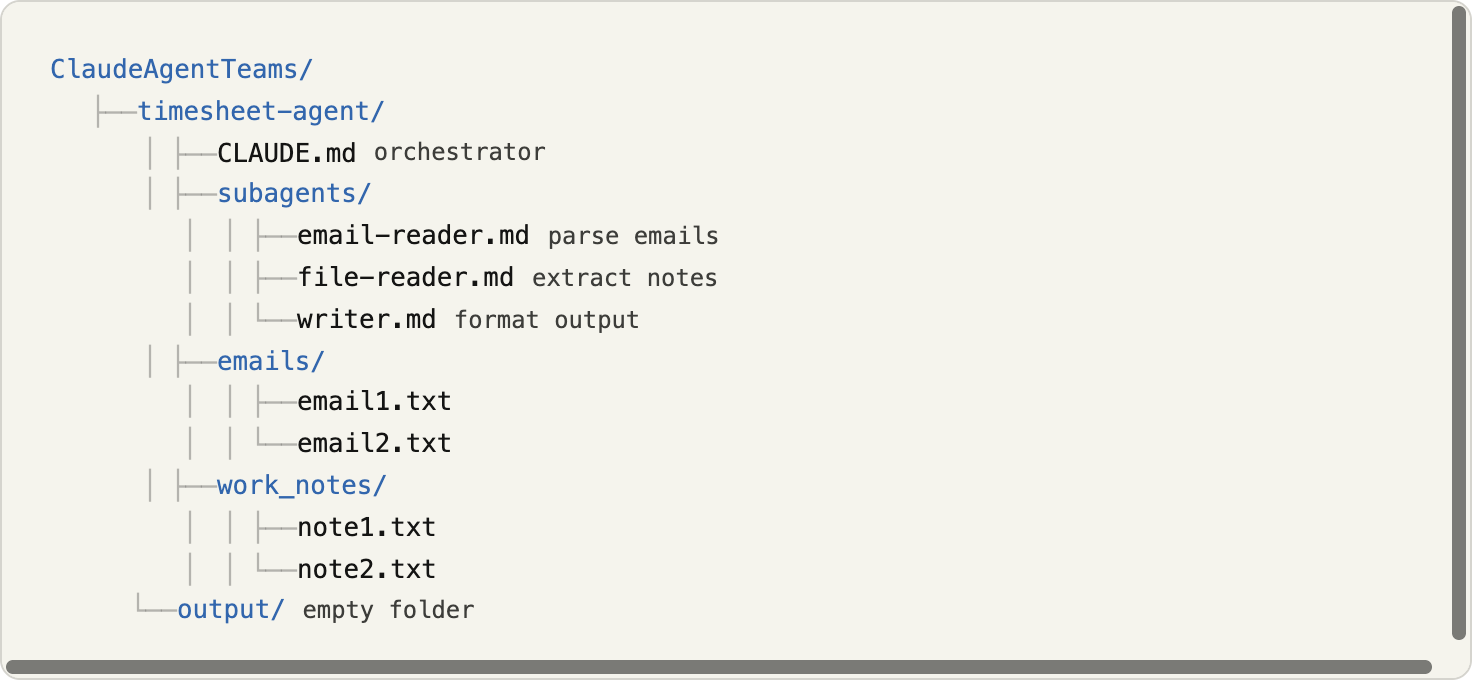
That’s your ClaudeAgentTeams folder structure in tree format. It maps exactly to what you uploaded, just expanded with the full multi-agent setup:
CLAUDE.md is your main orchestrator at the root of
timesheet-agent/subagents/ contains three worker definitions
emails/ and work_notes/ contain your emails and work related notes
output/ is where results go
💡 You could potentially connect to emails or notes on OneDrive folder via MCP (Model Context Protocol), but I wanted to skip it to keep this article simpler.
(Optional) Install tmux
I’ve installed tmux to visualize how agent teams work in practice. It lets you see each agent running in its own pane, side by side, in real time. You can watch the EmailReader and FileReader working simultaneously while the Writer pane sits idle, waiting. Then the Writer lights up once both inputs arrive.
It’s not required. But if you want to actually see the parallelism happening, tmux makes it tangible.
If you are using MAC, you can install tmux by running this command in your terminal:
brew install tmuxThen, start a new session:
tmux new-session -s agentsIf you are not familiar with tmux and its commands, Claude is your friend. Ask it how to split your terminal into 4 pane layout.
Step 2: CLAUDE.md
Here is the actual CLAUDE.md file I have used:
# Timesheet Agent — Orchestrator

You are Asli's timesheet automation assistant. Your job is to gather all work activity from emails and notes, then produce clean billing and timesheet documents.

## Workflow

### Step 1 — Parallel data collection

Spawn two agents **at the same time** using the Task tool (both in the same message, do not wait for one before starting the other):

1. **EmailReaderAgent** — reads `emails/` directory using instructions in `subagents/email-reader.md`
2. **FileReaderAgent** — reads `work_notes/` directory using instructions in `subagents/file-reader.md`

### Step 2 — Wait for both

Wait until both agents have returned their structured summaries. Do not proceed until you have output from both.

### Step 3 — Hand off to WriterAgent

Spawn **WriterAgent** using instructions in `subagents/writer.md`. Pass it the full text output from both reader agents. WriterAgent will produce:

- `output/billing.md` — grouped by client, hours, descriptions
- `output/timesheet.md` — chronological, admin-friendly

## Rules

- Always run EmailReaderAgent and FileReaderAgent in parallel, never sequentially.
- After WriterAgent completes, confirm to the user that both files have been written and print the path to each.
Step 3: Agents Team
This is where you define the team.
Your CLAUDE.md spawns EmailReaderAgent and FileReaderAgent in parallel and passes their combined output to Writer:
# Timesheet Agent Team

## Agent: EmailReader
Role: Read today's emails and extract a structured list of tasks, meetings, and client interactions.
Output format: Bullet list grouped by client, with estimated time per task.

## Agent: FileReader
Role: Read recent work files and notes, extract a structured list of deliverables worked on.
Output format: Bullet list grouped by client, with estimated time per task.

## Agent: Writer
Depends on: EmailReader, FileReader
Role: Merge the outputs from both agents. Produce two documents:
1. Client billing summary (grouped by client, with total hours)
2. Admin timesheet (formatted as [your timesheet format])
Tone: Professional, concise, ready to paste directly into billing system.
The "Depends on" line is what makes this a team instead of three separate agents. It tells Claude Code: don't start the Writer until EmailReader and FileReader have both delivered their outputs.
Step 4: Action
If you have installed tmux, you can split your terminal layout. Here is how my terminal looks like:
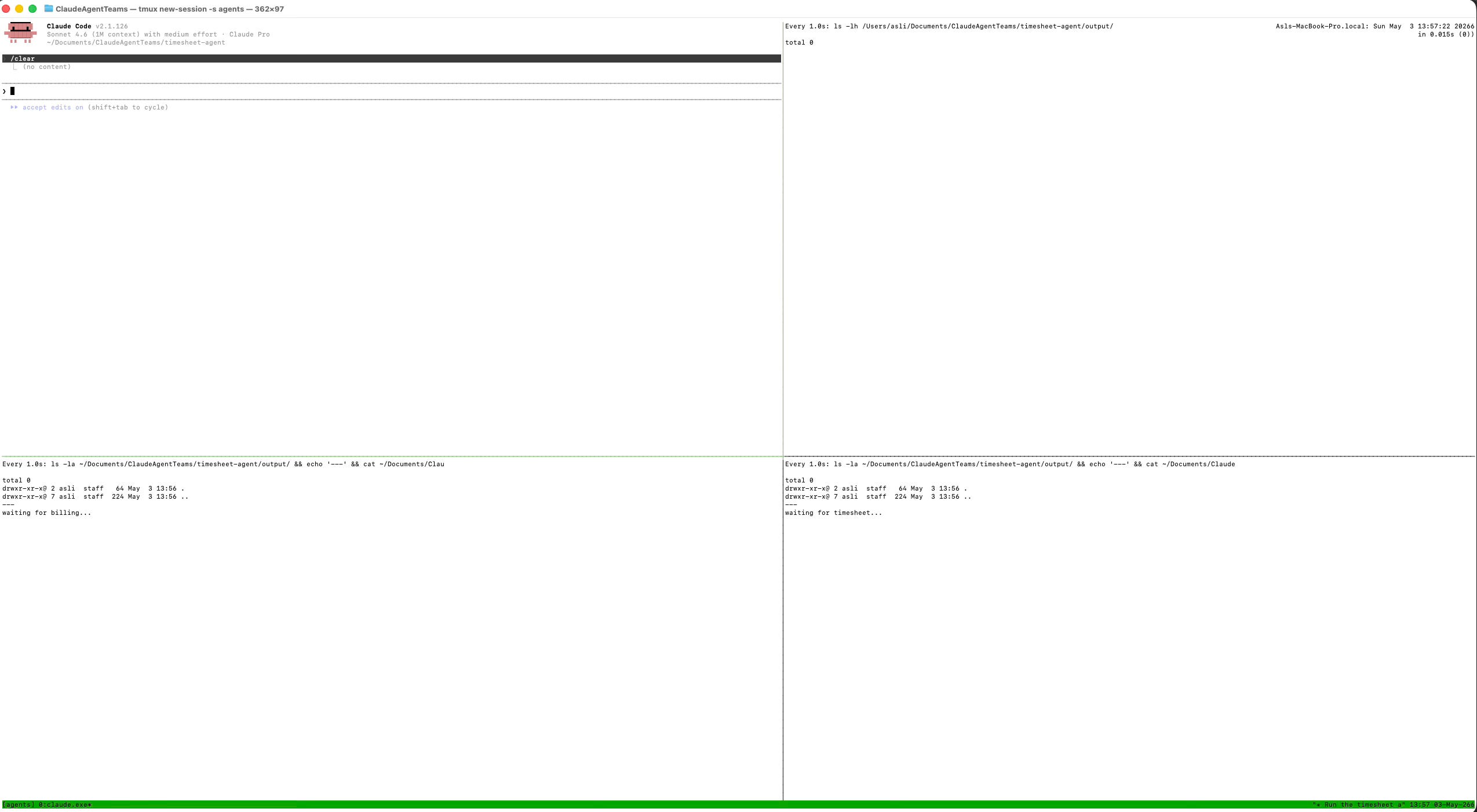
Top-left: Shows running Claude Code session.
Top-right: Keeps track of output folder. Currently, it is empty.
Bottom-left: Waiting for billing file to be created.
Bottom-right: Waiting for timesheet file to be created.
Four panes. Three agents standing by. Output folder is empty. This is what it looks like right before you type the prompt.
In top-left session, run this command:
run the timesheet agent team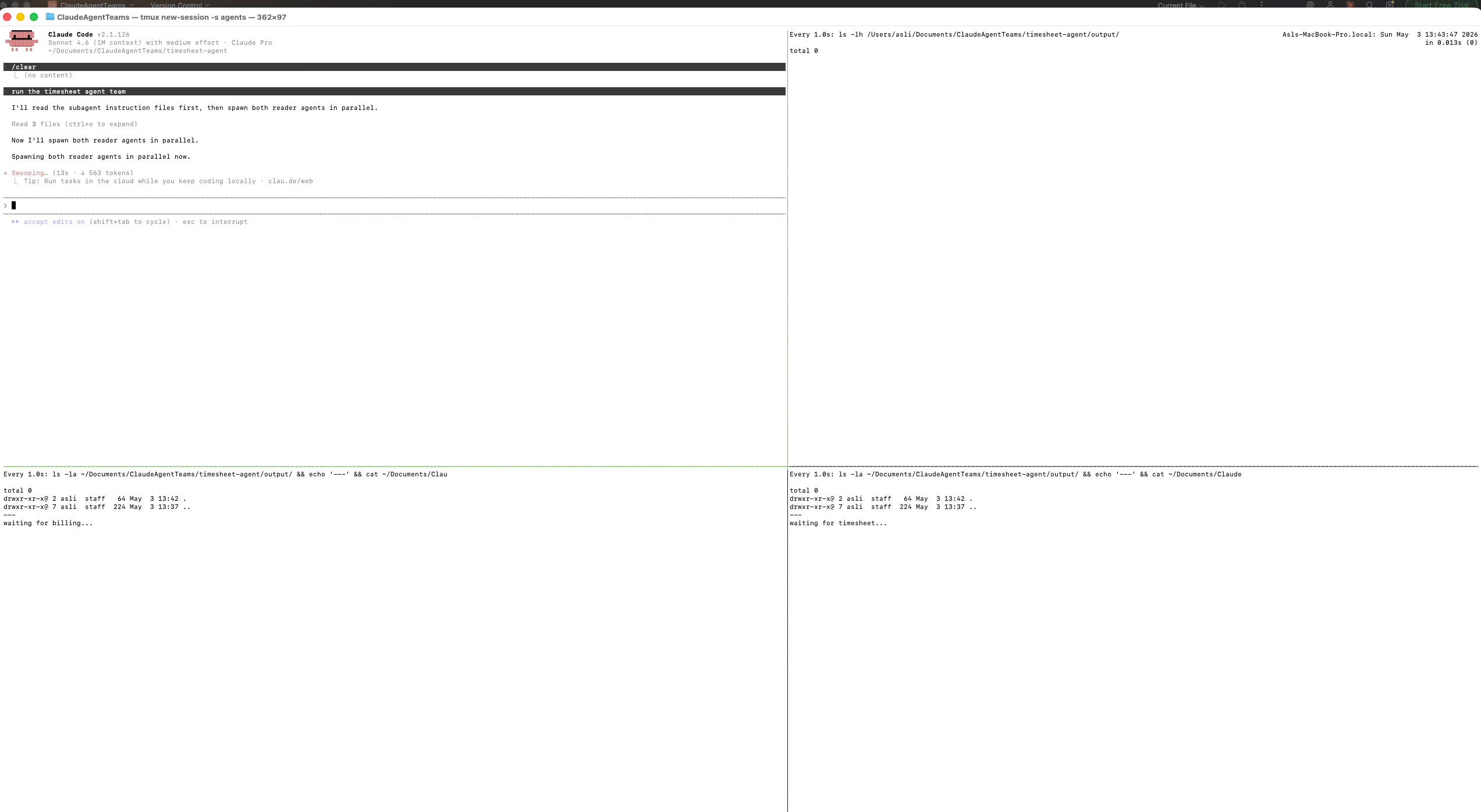
I typed “run the timesheet agent team” and hit enter.
Look at what happened in the top-left pane immediately:
“I’ll read the subagent instruction files first, then spawn both reader agents in parallel. Spawning both reader agents in parallel now.”
The agents didn’t queue up. They didn’t take turns. They swarmed; both launched at the same instant, each heading toward their own source.
In couple of seconds, two agents woke up simultaneously. One started reading emails. The other started reading work notes. Neither waited for the other. They just worked, in parallel, like two colleagues opening different files on the same morning.
By the time you’d have opened your first email manually, both were already done.
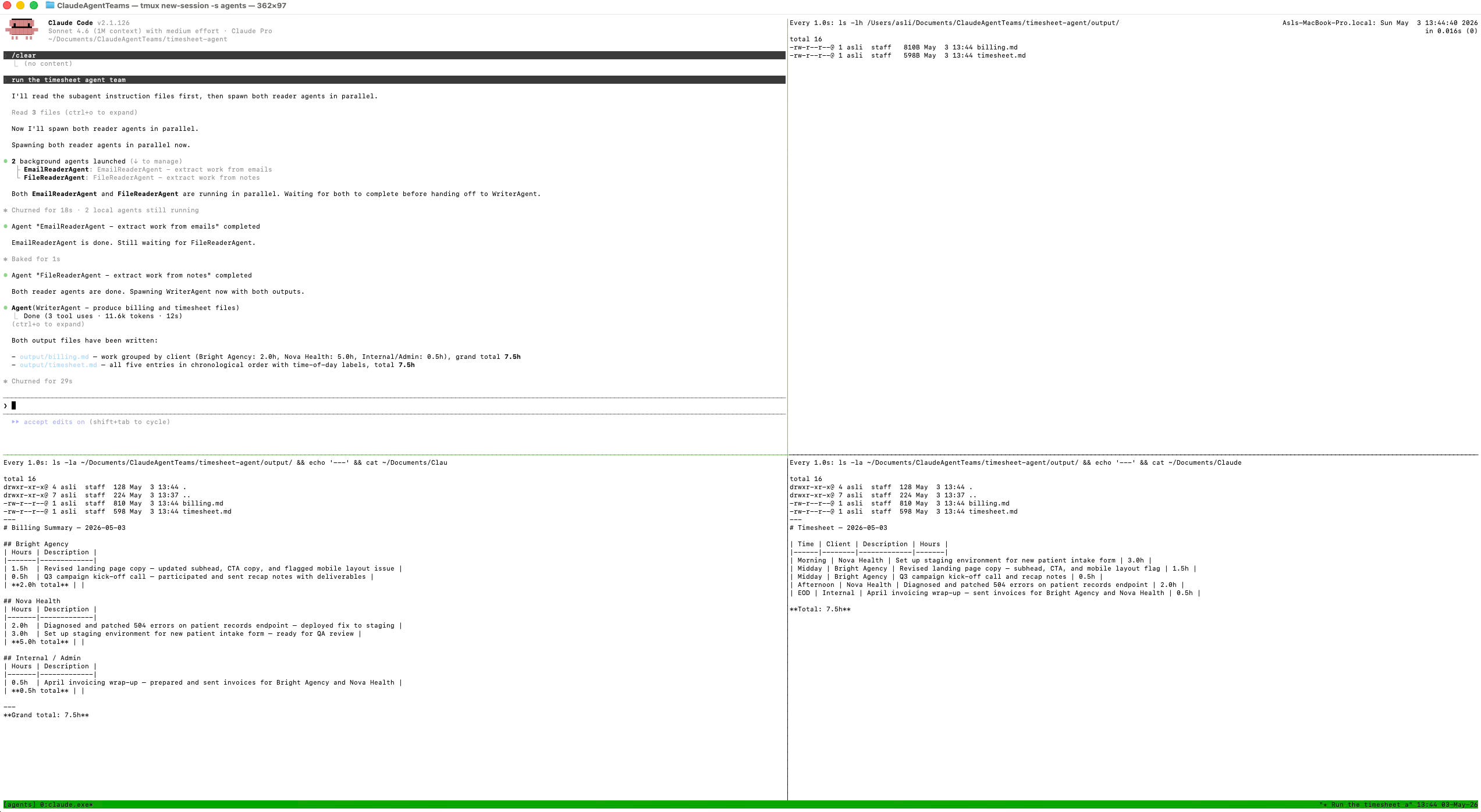
This is the “after” state. Everything is done.
Top-left: the orchestrator’s complete log. Read it top to bottom and you get the whole story: agents launched in parallel, both finished, writer took over, both files delivered. “Churned for 29s”. Less than half a minute.
Top-right: the output folder, live. Two files just appeared: billing.md and timesheet.md. They weren’t there 29 seconds ago. Now they are.
Bottom-left: the billing summary. Grouped by client. Hours tallied. Descriptions written. Bright Agency, Nova Health, Internal/Admin. Grand total: 7.5h. Ready to send.
Bottom-right: the timesheet. Chronological, clean, professional. Morning through EOD. Every task, every hour, every client. Ready to submit.
The story this screenshot tells:
One prompt. Three agents. 29 seconds. This is how you can save 45 min a day.
💡 You can generate billing or timesheet files however you like. Billing file can be .txt and timesheet file can be in excel format.
Here is how billing file looks like:
BILLING SUMMARY — May 3, 2026

BRIGHT AGENCY

2.0h  Revised landing page copy — trimmed subhead, updated CTA, flagged mobile layout issue to dev
0.5h  Q3 campaign kick-off call recap — scope: messaging framework and 3 content formats by May 20
Total: 2.5h

NOVA HEALTH

2.0h  Investigated and patched 504 errors on patient records endpoint — fixed exhausted DB connection pool
3.0h  Set up staging environment for new patient intake form — cloned schema, ran smoke tests, fixed validation issues
Total: 5.0h

INTERNAL / ADMIN

0.5h  April invoicing wrap-up — prepared and sent invoices for Bright Agency and Nova Health
Total: 0.5h
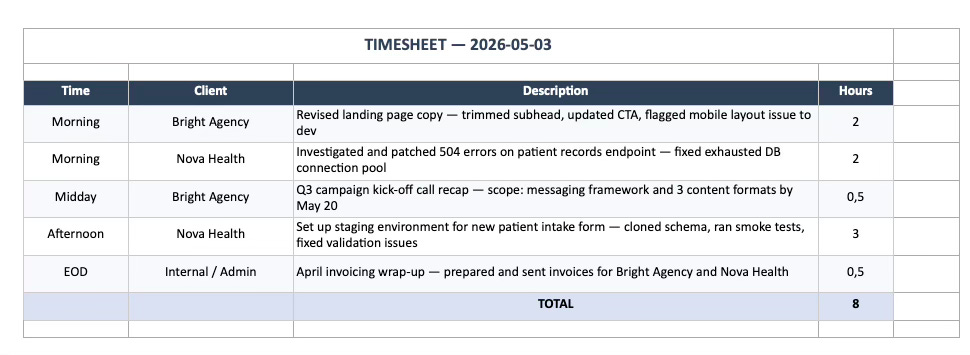
And timesheet file (generated in .xlsx format):
Build Your Own AI Agent Team in One Sitting
Here’s a simplified version you can set up in one sitting, even if your workflow is different from my subscriber’s:
Identify two independent sources of information you regularly combine by hand. Could be emails + notes, Slack messages + project docs, calendar + task list.
Enable agent teams in your Claude Code
settings.jsonusing the config block above.Write a
CLAUDE.mdwith three agents: two readers (one per source) and one writer that depends on both. Use the template above as your starting point.Define the output format for each reader agent. Be specific. “Bullet list grouped by client” is better than “summarize what I worked on”.
Define the final output for the writer agent. What does the merged document actually look like? If you have an existing timesheet template, paste an example into the writer agent’s instructions.
Run it. Review the output. Tweak the agent instructions based on what’s missing or messy.
The whole setup takes maybe 20 minutes the first time. After that, it’s a single command.
Which part clicked for you? Or which part still feels fuzzy? Drop it below; your question might be the next article!
PS: If you're new here and wondering why a software engineer is writing about all this - here's why I started Becoming with AI."