

TL;DR;
Most people open Claude Chat, paste one document, get one answer, then repeat, manually, for every other file. That’s not a workflow. That’s copy-paste with extra steps.
Claude Cowork fixes this. It’s not a chatbot. It’s an AI coworker that reads your entire folder, writes in your voice, and delivers board-ready documents — while you grab a coffee. ☕ No coding required.
What’s inside this guide:
Claude Cowork vs. Regular Chat: Why pointing AI at a folder changes everything — and why it’s the professional upgrade non-technical users have been waiting for.
The Nina Case Study: How one Head of Ops turned 3 pages of messy meeting notes into a polished board presentation in minutes — without touching PowerPoint.
Build Your AI Digital Twin: The
voice.mdandworking-style.mdsystem that makes Claude sound like you, not a generic assistant.The Master Prompt Formula: The exact briefing format that gets Claude Cowork to nail the task on the very first try.
Pro Tips for Non-Techies: Why plain text files are your secret weapon — and how to set up your Skills folder for maximum speed.
The Bottom Line: You don’t need to be a developer to automate your job. You just need the right context — and this guide gives it to you.
Already comfortable with Cowork? My vibe coding guide shows you how to go one level further: building real tools with AI.
Welcome👋🏻
I am a Software Engineer with 10+ years of experience. My goal is to close the gap between the technical and the non-technical, making AI accessible to everyone, regardless of their background.
It's Monday morning, you have 3 pages of messy notes from last week's meetings, a presentation due by Thursday, and a to-do list that didn't shrink over the weekend. You open Gemini or regular Claude.
You paste one document.
You get one answer. Then you repeat, manually, for the next file.
However, this is just a copy paste with extra steps, not a workflow.
If you feel like you're working for your AI instead of the AI working for you, there is a new solution: Claude Cowork.
What Is Claude Cowork? (And How It Differs from Regular Claude Chat)
When Anthropic released Claude Code, the developer tool, they started to see that developers started to use it for everything: including to keep a plant alive, without human intervention.
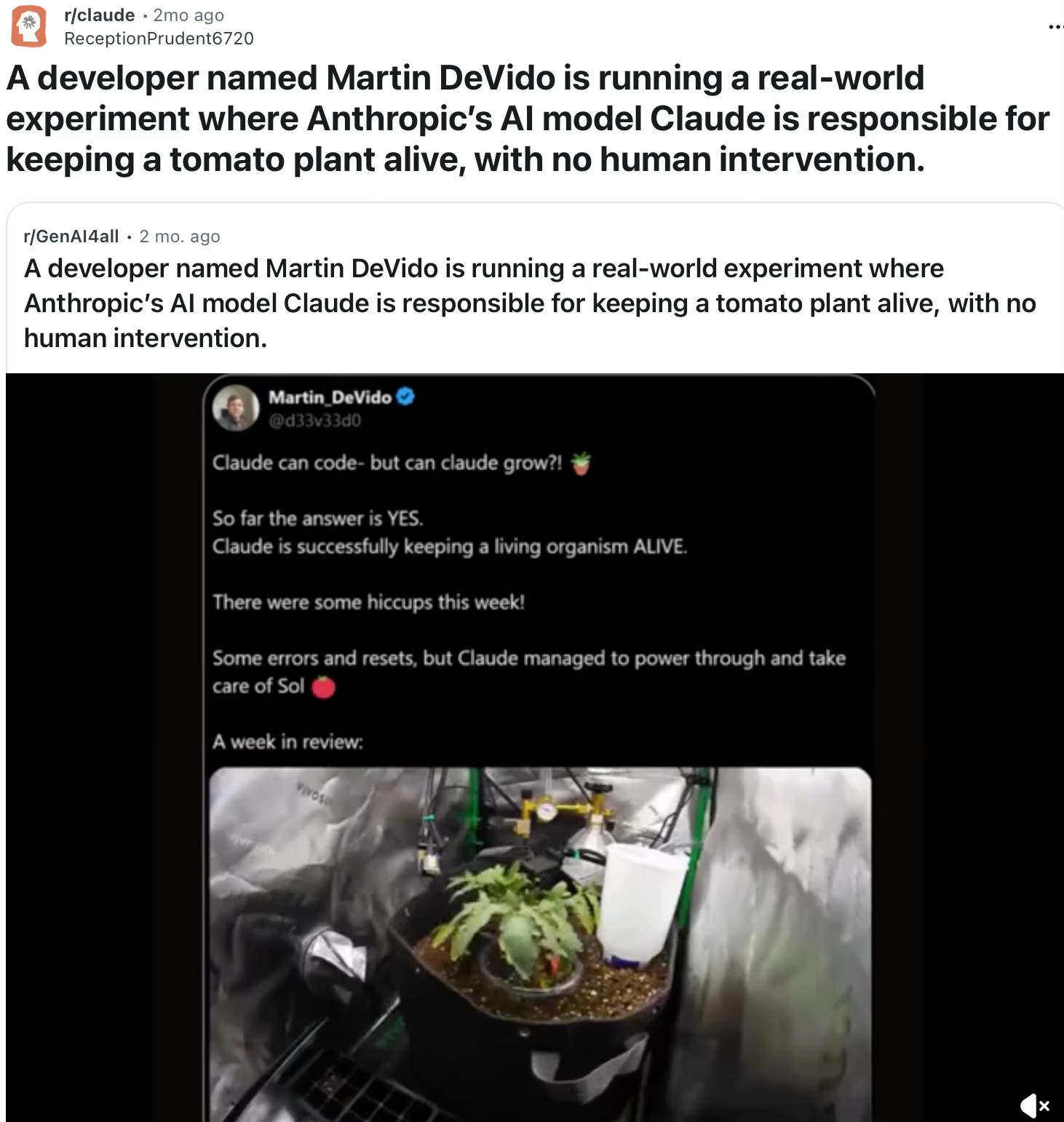
Because of its potential, non-technical users also wanted to use Claude Code. The problem with that is terminal interface was intimidating for some.
Cowork is the answer to that problem. It takes that high-level “coding power” and puts it into a clean, friendly interface (Claude Desktop app) that anyone can use.
The Game-Changer: How Claude Cowork Reads Your Entire Folder
The biggest difference between regular Chat and Cowork is access.
In a regular chat, Claude can only see what you upload to that specific window. With Cowork, you point it at a folder on your computer. This is the game-changer. Once you give Claude permission to look at a folder, it can:
Read every file in that folder at once.
Edit those files.
Create brand new files (like spreadsheets or outlines) directly onto your hard drive.
Delete
Claude Cowork Setup: Plans, Devices, and What You Actually Need
Cowork is available for Pro ($20/month), Max, Team, and Enterprise plan subscribers using the Claude Desktop app on macOS or Windows.
Open Claude Desktop, look for the mode selector that includes “Chat” and the Cowork tab, and click “Cowork” to switch to Tasks mode.
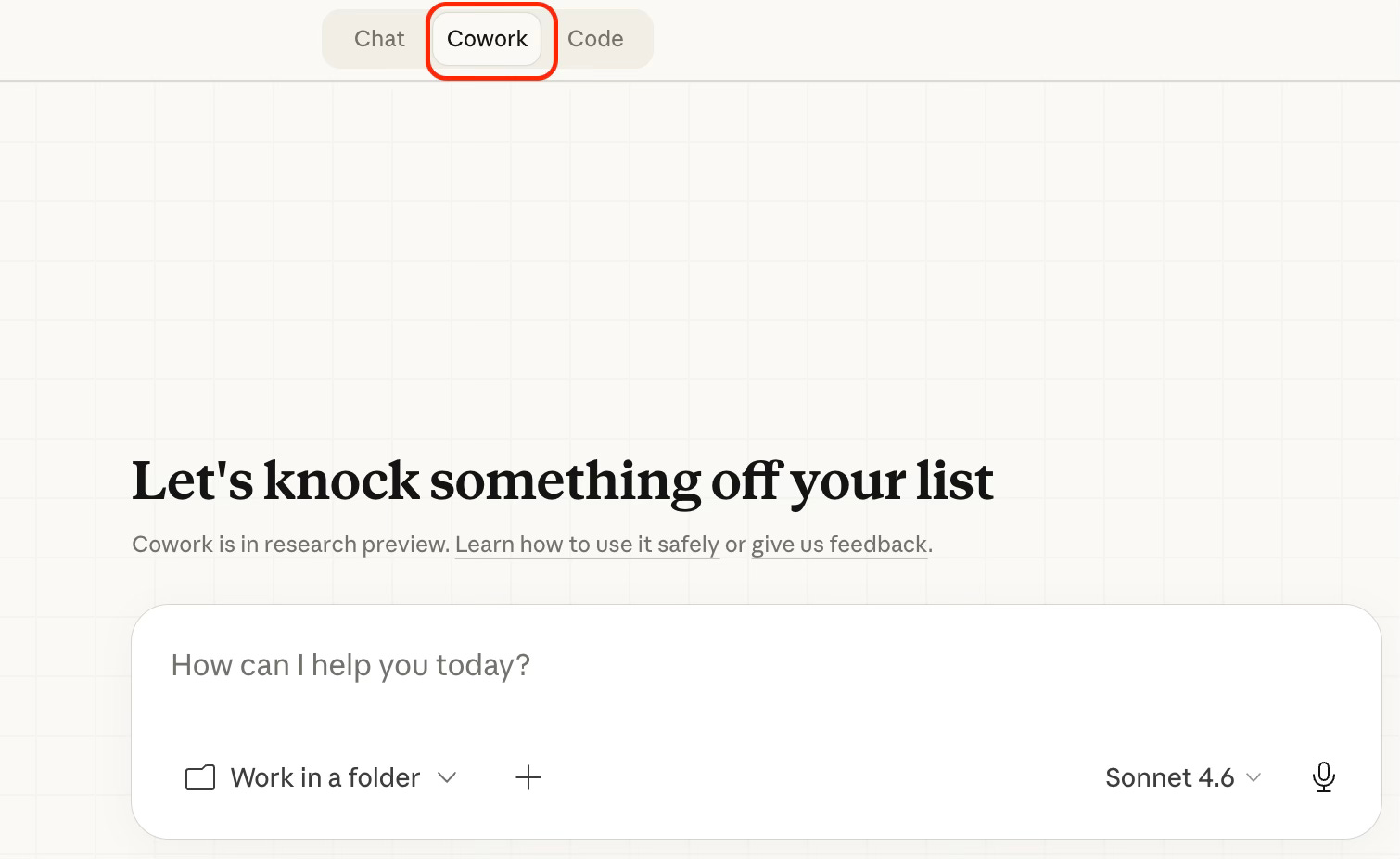
You point it at a folder on your computer. That's the key step. Claude can then read, edit, or create files in that folder.
Pro Tip:
The Claude Desktop app must remain open while it’s working.
Real-World Example: Automating a Board Presentation with Claude Cowork
To see how this works in real life, let’s look at FakeCo Coffee Company.
The Player: Nina, Head of Operations.
The Challenge: Nina just finished a marathon meeting with Product Managers about the Quarterly Roadmap. She has a folder full of messy transcripts and rough notes. She needs to turn these into a polished Board Presentation by April 3rd.
Instead of spending five hours summarizing and typing, Nina uses Cowork.
Step 1: The Setup
Nina puts all her meeting notes and data.csv into a dedicated folder called FakeCo Coffee.
Step 2: The Command
She opens Claude Desktop, switches the mode to Cowork, and points it to that folder. She gives one simple prompt:
Read the meeting notes in this folder. Create a PowerPoint presentation for the board
meeting on April 3rd. Cover what we achieved last quarter, what went wrong,
what we're focusing on next quarter, and key risks. 10 slides max.
Professional but warm tone - this is a coffee company, not a bank.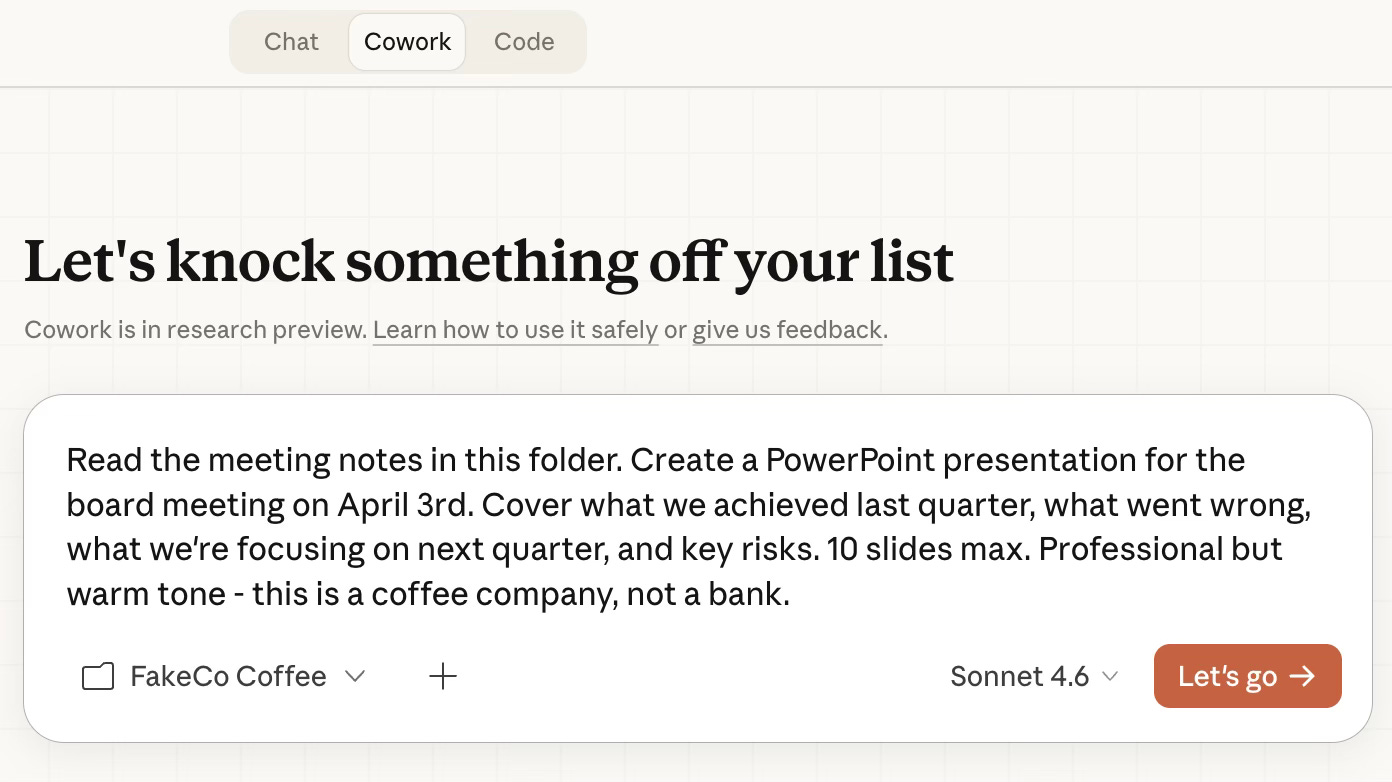
Step 3: The Execution
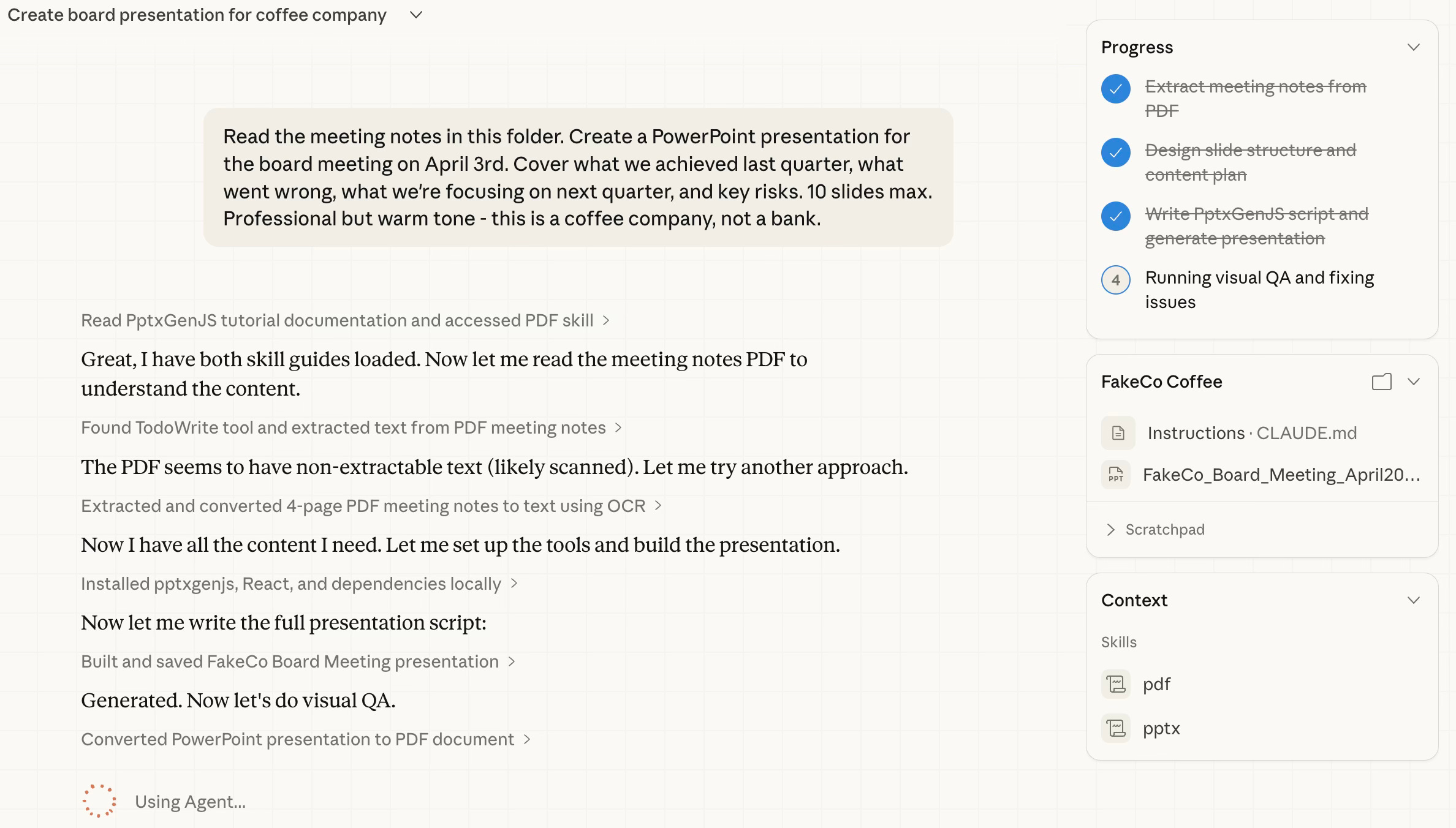
Nina watches as Claude “thinks”. She can follow the progress while Claude Cowork does its job.
Step 4: The Result
In minutes, Nina has a structured outline and a summary of the data saved directly to her computer. She didn't copy and paste a single word.
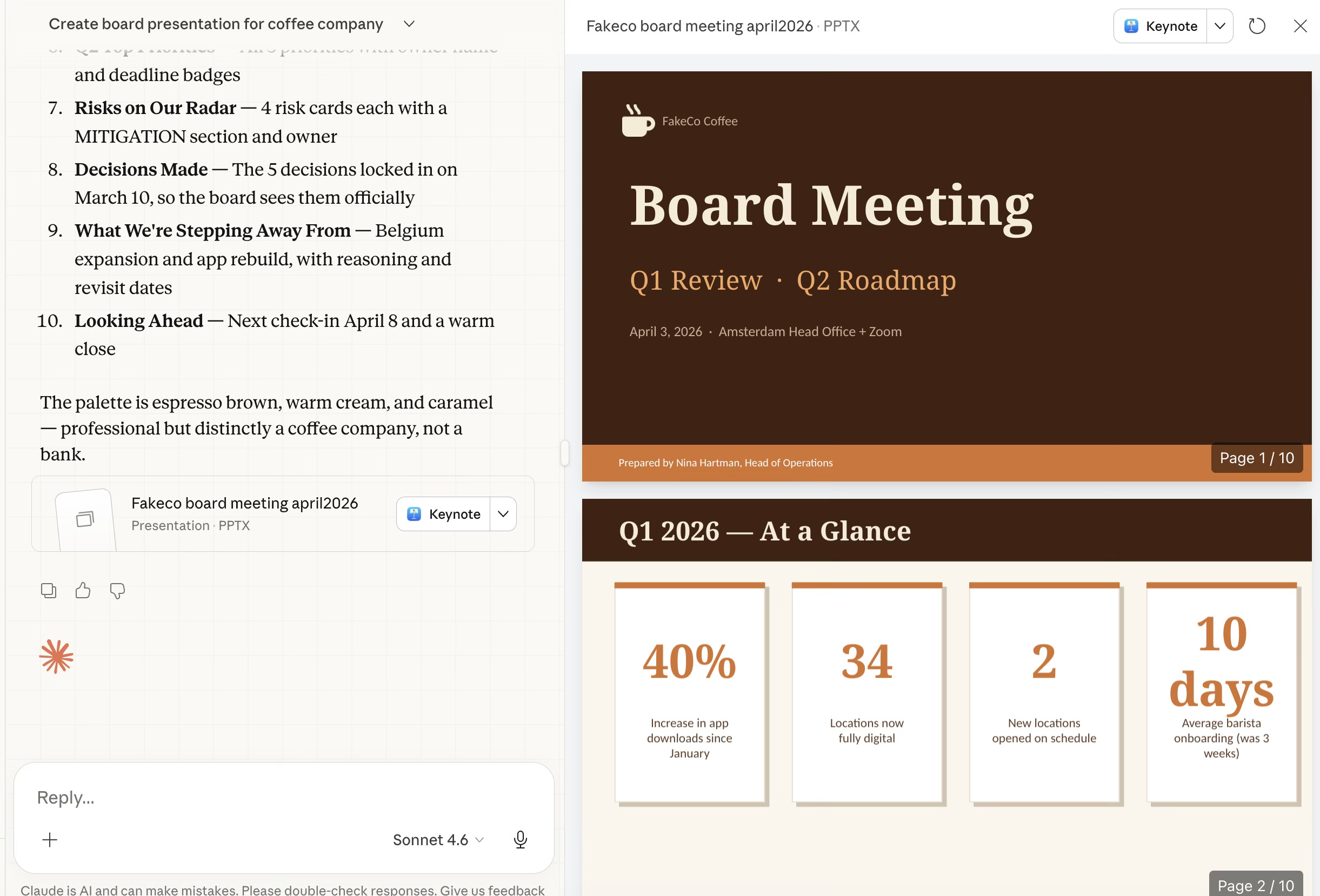
Congratulations to Nina, she made her presentation in a couple minutes instead of spending hours!
However, there is a small catch.
Because Nina gave Claude a broad instruction, the AI had to fill in the blanks. It “guessed” the tone, the structure, and the formatting. While the content is accurate, the presentation might feel a bit generic. It doesn’t yet sound like Nina, and it certainly doesn’t look like FakeCo.
Build Your AI Digital Twin: The voice.md and working-style.md System
This is where we move from “cool AI trick” to “professional-grade workflow”.
By default, Claude Cowork is a bit of a guesser. If you don’t give it specific instructions, it will pick generic colors, standard fonts, and a “helpful assistant” tone that might not sound like you at all.

To get a board-ready result, you need to provide the Guardrails and the DNA.
The Two Ingredients for a Perfect Draft
To turn a generic outline into a masterpiece, Nina adds two types of files to her FakeCo Coffee folder:
1. The Corporate Guardrails (Brand Guidelines)
Most companies have a “Brand Guidelines”. It’s the PDF that tells you which hex codes (colors) to use, which fonts are allowed, and how the company logo should be placed. It ensures that whether a document is created in London or Los Angeles, it always looks like FakeCo.
2. The Digital DNA (Personal Identity Files)
This is the secret sauce that makes the presentation sound like Nina, not a robot. Nina keeps three small text files in her folder to act as a manual for her AI:
about-me.md: Her role, expertise, and the specific perspective she brings to the team.voice.md: Her linguistic style (e.g., “I prefer data over fluff,” “Use short, punchy sentences,” or “Never use the word ‘synergy’”).working-style.md: How she structures her thoughts (e.g., “I always start with the biggest challenge first”).
This setup will help you to onboard Claude Cowork so that it can do exactly what you said.
about-me.md
By creating this simple text file, Nina has essentially given Claude a blueprint of who she is.
# About Me

## Who I Am
My name is Nina Hartman. I am the Head of Operations at FakeCo Coffee,
a Dutch coffee shop chain with 34 locations across the Netherlands.
I have been with the company for 6 years.

## What I Do
I run the quarterly planning process and own the relationship with the
leadership board. My job is to turn what the product team knows into
something the board can act on. I sit between the people doing the work
and the people making the big decisions.

## My Audience
The people I write for are busy executives. They do not want to read long
documents. They want to know: what happened, what are we doing about it,
and what do they need to decide. If I give them a wall of text, I have
already failed.

## What Good Work Looks Like for Me
- A document that gets to the point in the first paragraph
- Clear headings so people can scan before they read
- Numbers where possible — not "sales improved" but "sales up 18%"
- Action items that say who does what by when
- An executive summary at the top of anything longer than one page
voice.md
In a standard chat, Claude is a generalist. It tries to please everyone, which often results in that "too-polite AI" tone. By adding a voice.md file to her folder, Nina does something radical: she gives the AI a personality filter.
# My Voice & Communication Style

## The Feeling I Want
Warm but professional. We are a coffee company — we have personality.
But I am writing for a board, so it still needs to feel serious and
trustworthy. Think: a confident manager giving a clear update, not a
consultant writing a report.

## Tone
- Direct. Say the thing. Do not bury it.
- Human. Write like a real person, not a press release.
- Honest. If something went wrong, say so clearly and say what we are
  doing about it. Do not hide bad news behind vague language.
- Confident but not arrogant. We know what we are doing, but we are
  also learning as we grow.

## Language Rules
- Short sentences. If a sentence has more than 20 words, split it.
- No jargon. If I would not say it out loud in a meeting, do not write it.
- No filler phrases. Avoid: "It is important to note that...",
  "As previously mentioned...", "In conclusion..."
- Active voice. "We launched the app" not "The app was launched."
- Numbers over vague claims. "31% fewer drop-offs" not "significantly fewer."

## Words I Like
clear, honest, simple, on track, real, practical, next step, decision

## Words to Avoid
synergy, leverage, holistic, deep dive, circle back, bandwidth,
move the needle, at the end of the day, going forward

## Format Preferences
- Start with the most important thing, not background context
- Use bullet points for lists of 3 or more items
- Bold the key word or number in each bullet, not the whole sentence
- Tables for comparisons and status updates
- One idea per paragraph
Most people spend 30 minutes editing an AI response to make it sound like them. Nina spends 30 seconds updating her voice.md file once, and every document Claude creates from that point forward arrives already sounding like her.
working-style.md
If voice.md gives Claude a personality, working-style.md gives it a workflow.
Look closely at Nina’s rules. She isn’t just asking for a summary; she is setting professional boundaries that prevent the “AI hallucinations” and “over-explaining” that drive most users crazy.
# How I Like to Work With Claude

## Before You Start Any Task
1. Read about-me.md and voice.md first, every time.
2. Ask me 2 to 3 clarifying questions if anything about the task is unclear.
   Do not guess and produce something wrong. It wastes both our time.
3. Show me your plan in plain language before you start writing or creating files.
   I want to approve the approach, not just the output.

## While You Work
- Save your output directly into the "outputs" subfolder in this project folder.
- Name files clearly: use the format YYYY-MM-DD-description
  (example: 2026-03-14-board-presentation.pptx)
- If you are unsure about something mid-task, stop and ask. Do not fill gaps
  with invented content.
- Never delete any of my files. Only create new ones or edit files I
  specifically ask you to edit.

## Output Format Defaults
- Presentations: PowerPoint (.pptx), maximum 12 slides unless I say otherwise
- Documents: Word (.docx) with an executive summary at the top
- Summaries and notes: Markdown (.md) saved in the outputs folder
- Spreadsheets: Excel (.xlsx) with clear column headers and totals

## How I Like to Review
When you finish, give me a short summary (3 to 5 sentences) of what you made,
what decisions you made along the way, and if there is anything you are
unsure about. Do not just say "Done." Tell me what I am looking at.

## What I Do Not Want
- Long explanations of what you are about to do — just do it
- Apologies or disclaimers at the start of every response
- Generic filler content — if you do not have the information, ask me for it
- More than one version of the same thing unless I ask for options
Setting up a working-style.md file is the difference between a “Chatbot” and an Agent. You are training Claude to work the way you work. If you like to see a plan before the writing starts, put it in the file. If you hate Excel but love Markdown, put it in the file.

By combining these three identity files; About Me, Voice, and Working Style, Nina has created a digital twin that doesn't just “help” with the work; it executes the work exactly the way she would.
Do you want to know more about how to create your own Digital Twin? Let me know in the comments!
Pro Tip:
You only have to write these files once. You can then copy them into every new project folder you create. It’s like bringing your best assistant with you to everyday.
Claude Skills: How to Give Your AI Institutional Memory
If the .md files we discussed earlier are Nina’s “Digital DNA”', Claude Skills are her Professional Toolkit.
A “Skill” is the difference between telling a new employee, “Make a presentation,” and giving them the company brand book, the official slide template, and three examples of board decks the CEO actually liked. It’s the same person, but the output is on a completely different level.
The FakeCo “Brand Skill”
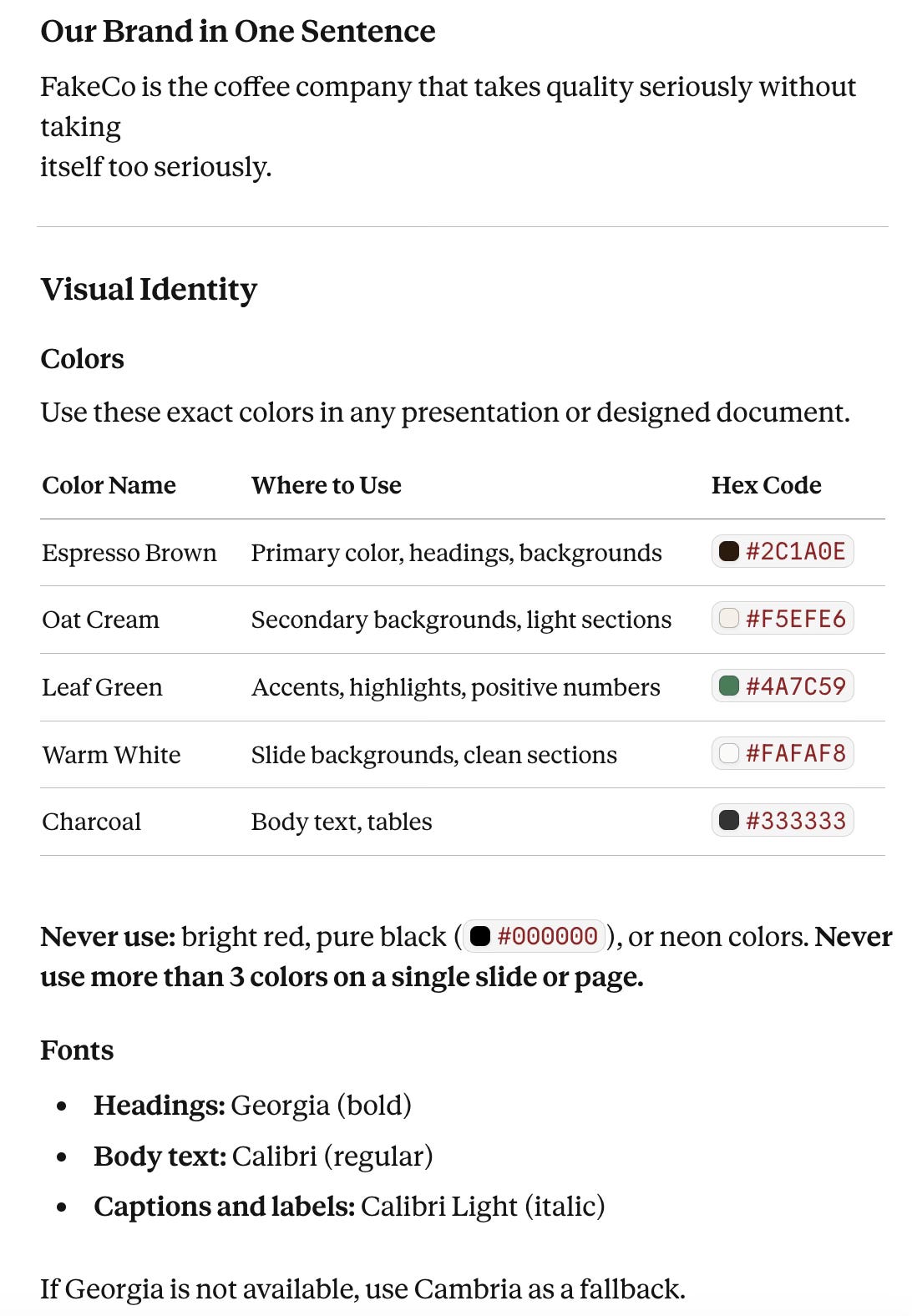
To ensure her work is never generic, Nina adds the FakeCo Brand Skill to her folder. This isn’t just a list of colors; it’s a comprehensive guide that tells Claude exactly how to behave as a representative of the company.
The FakeCo Brand Skill includes:
Visual Identity: The exact Hex codes (like Espresso Brown and Oat Cream) so every chart and slide background matches the brand.
The “One-Sentence” Mission: “FakeCo is the coffee company that takes quality seriously without taking itself too seriously”. This gives Claude a “North Star” for the tone of every sentence.
Structural Rules: Hard constraints like “Always lead with the conclusion” and “Never write a paragraph longer than four sentences in a board document”.
Why “Skills” Change the Game
When you use a Skill in Cowork, you are effectively giving Claude Institutional Memory.
Instead of Nina having to remind the AI to use “Leaf Green” for positive numbers every single time she starts a new chat, she simply points it at the Brand Skill. Claude now “knows” FakeCo. It understands that “Warm White” is for backgrounds and “Charcoal” is for body text.
Do you want to know more about Claude Skills? Let me know!
Summary: The Nina + FakeCo Formula
Nina has now built a perfect environment for high-level work. By combining her Personal Identity Files with the FakeCo Brand Skill, she ensures her work is:
Personal: It sounds like her voice.
Professional: It follows her working style.
On-Brand: It looks and feels like FakeCo Coffee Company.
Pro-Tip: Choosing the Right File Format
You don’t have to use
.md(Markdown) files, Claude can read PDFs and Word docs just fine. However, there is a “secret” advantage to using Markdown for your instructions:
For Context & Skills (
voice.md,about-me.md, etc): Use .md or .txt. These are “plain text,” which means Claude can read them instantly and perfectly without having to “extract” text from a complex layout. Think of it as giving Claude a clean, typed note instead of a photocopied page.For Source Material (Meeting notes, PDFs, data): Use whatever you have. If your notes are in a
.docxor your data is in a
The Master Prompt Formula for Claude Cowork
With her “Context Files” in place and her data ready, Nina is ready for the finish line. She doesn't just ask Claude to “write a deck”. She gives a Master Command that points to everything she has prepared:
Read all files in this folder carefully before you start:

- about-me.md — who I am and who my audience is
- voice.md — how the writing should sound
- working-style.md — how I want you to work
- fakeco-brand-skill.md — how FakeCo documents look and feel
- meeting-notes-fakeco.md — the source content
- fakeco-data.csv — the numbers behind the story

Once you have read everything, ask me 2-3 clarifying questions before you start.

Then create a PowerPoint presentation (.pptx) for the FakeCo board meeting on
April 3rd, 2026.

The presentation should:

* Be 10 to 12 slides maximum
* Follow the slide order in the brand skill exactly
* Use FakeCo colors, fonts, and formatting from the brand skill
* Tell a clear story: here is what we achieved, here is what went wrong and why, here is
what we are betting on next quarter, here is what we need from you today
* Include at least 3 charts or visual data callouts from the CSV — focus on revenue trend,
location growth, and staff costs
* Flag any missing information with [CONFIRM WITH NINA] rather than inventing it

Save the finished file to the outputs folder as: 2026-03-10-board-presentation-v1.pptx

When done, give me a 3-sentence summary of what you built and flag anything you were
unsure about.
The Moment of Truth: Claude Becomes a Consultant
This is the part that usually shocks new users. In standard AI, you hit “Enter” and it starts talking. In Cowork, Claude stops to think.
Because Nina’s working-style.md told it to “Ask 2-3 clarifying questions,” Claude doesn’t just guess. It scans her notes, notices a drop in the revenue, and asks: "Nina, how do you want to frame this revenue drop from previous quarter?"
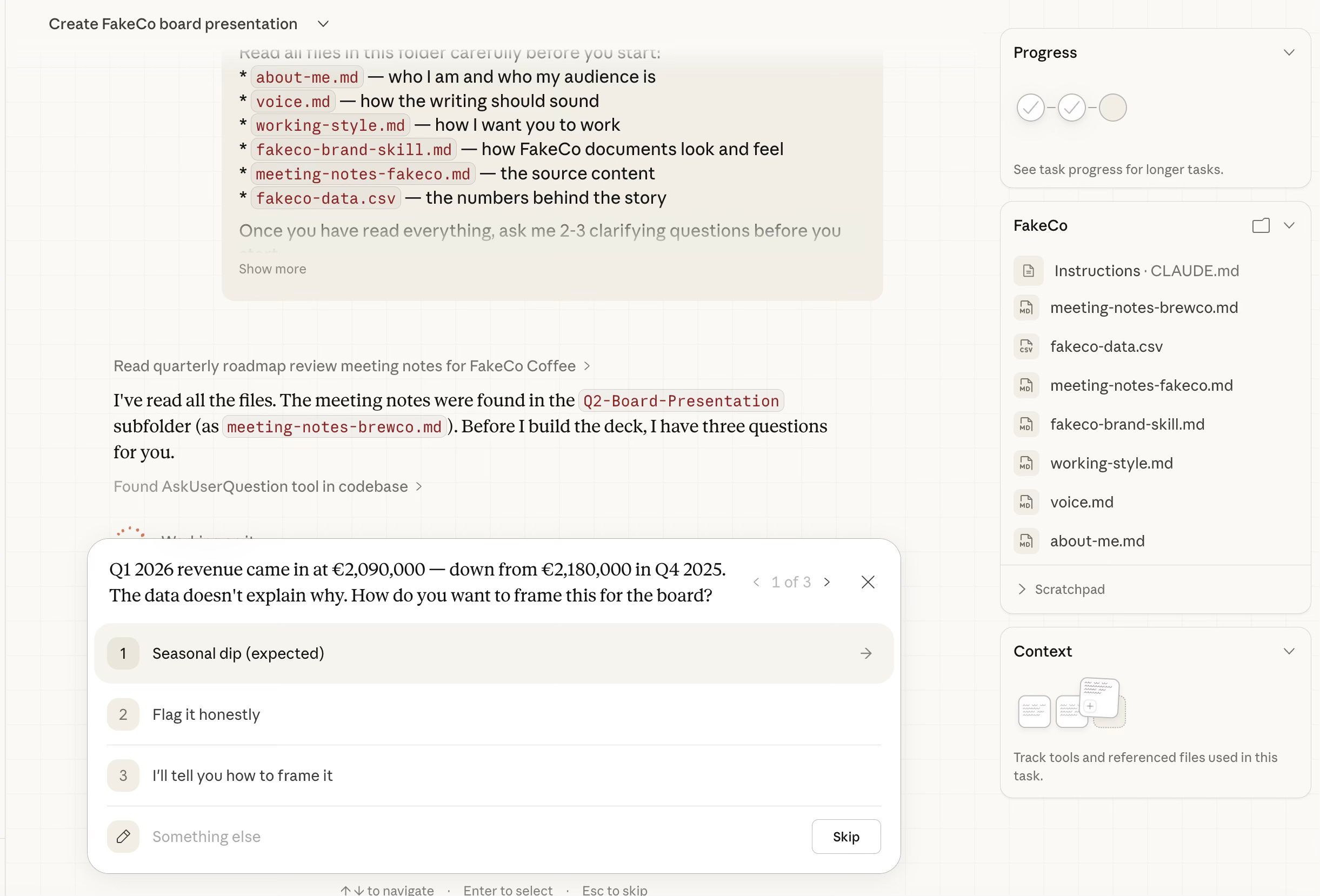
This is the shift from “Tool” to “Teammate”. By clarifying first, Claude ensures that the final presentation isn't just fast, it’s correct.
The Result: A Board-Ready Deck in Minutes
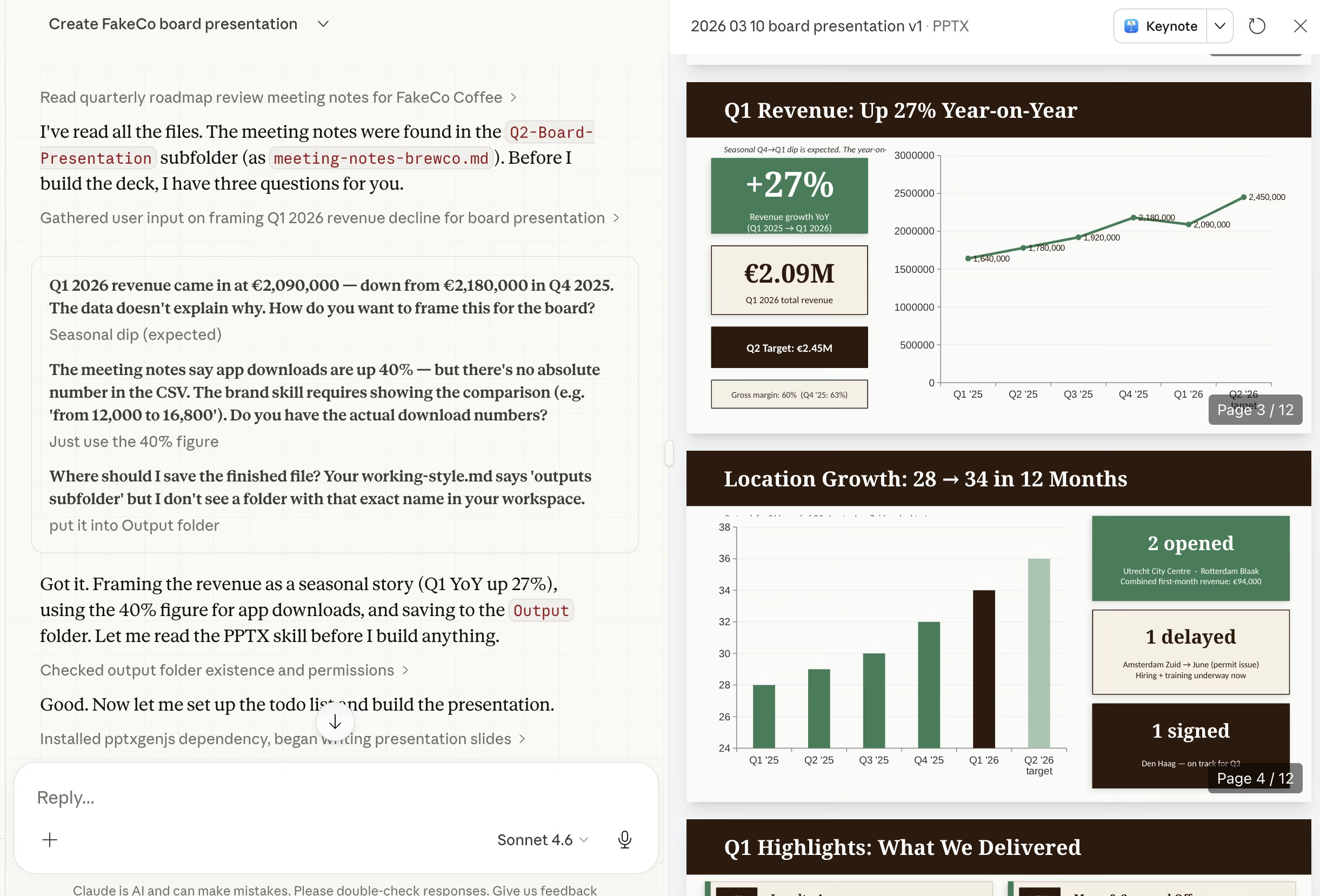
As Nina watches, Claude doesn’t just generate text, it builds. Looking at the final output, you can see the FakeCo Brand Skill in action. The slides aren’t just some generic backgrounds; they use the “Espresso Brown” headers, the “Oat Cream” accents, and clear, data-driven charts that reflect the CSV data Nina provided.
She didn’t spend her morning struggling with PowerPoint’s “Design Ideas” tool. She spent it as a Director, and Claude acted as her .
How to Brief Claude Cowork Like a Pro (Not Just Prompt It)
If you want these results, you have to move past “talking” to the AI and start “briefing” it. Think of Cowork like a highly talented intern: they are brilliant, but they can’t read your mind.
Use this simple formula for every task:
[What you have] + [What you want] + [How to format it] + [Constraints]
The Contrast:
❌ The Bad Prompt: “Make a presentation.”
Result: Claude will guess your colors, guess your audience, and guess your data. You’ll spend more time fixing it than if you’d done it yourself.
✅ The Good Prompt: “Turn these meeting notes into a 10-slide PowerPoint for a leadership update. Use our brand colors. Include key decisions, next steps, and exactly one slide per department.”
Result: You get a professional, structured document that requires minimal tweaking.
From Chatting to Building: What Claude Cowork Actually Changes
The true power of Claude Cowork isn’t that it can write; it’s that it can execute. By moving your work into folders and providing a bit of “Digital DNA” (your voice and style), you stop the endless cycle of copy-pasting.
Tomorrow morning, don’t start with a blank chat window. Start with a folder, a few .md files, and a clear goal.
Let Cowork handle the how so you can focus on the why.
Which part clicked for you? Or which part still feels fuzzy? Drop it below; your question might be the next article!
PS: If you're new here and wondering why a software engineer is writing about all this - here's why I started Becoming with AI."
The voice.md and about-me.md concept is the part of this that landed hardest. I work inside a large company where Copilot is the approved tool, and I used exactly this thinking — but started with what I had access to. Used Copilot's research mode to extract my communication patterns from emails and Teams messages, then fed the profile back as custom instructions. The result was the first time an AI draft sounded like me without three rounds of editing.
The interesting tension: Copilot has these customization features, but buries them. Claude's architecture pushes you toward building these context layers. The "teach the tool your voice" step might be the highest-ROI thing a constrained practitioner can do, regardless of which tool they're using. Writing about this exact jump at Constrained Intelligence.
the digital twin framing really clicked for me. most people treat AI context-setting as a one-time prompt, not as persistent infrastructure. voice.md and working-style.md are essentially the difference between hiring a temp who needs briefing every morning and an assistant who already knows how you think.
i've been experimenting with a similar setup in OpenClaw — they call the equivalent file SOUL.md, which leans more into identity than just style. interesting how different tools converge on the same underlying idea: the bottleneck isn't capability, it's context.
curious — when you first built your own voice.md, how long did it take before it actually felt accurate? i'm finding the first draft always sounds like how i think i sound, not how i actually sound.