

TL;DR
MCP stands for Model Context Protocol.
It is a standardized way for your AI to connect to outside tools and services: your email, your calendar, flight searches, file systems, you name it. Think of it as a universal adapter between your AI and the rest of your digital life.
Why MCP is needed? How can you use MCP? MCP vs API: What’s the Difference? Is MCP safe to use? What is the big update coming up in July 2026?
Now learn all these from a developer's perspective, without BS.
Merhaba👋🏻
I am a Software Engineer with 10+ years of experience. My goal is to close the gap between the technical and the non-technical, making AI accessible to everyone, regardless of their background.
If you read my earlier article on how LLMs work, you already know that the AI learned everything it knows from data collected up to a certain date. After that, it’s frozen; it has no idea what happened last week, what’s in your inbox, or what flights exist tomorrow.
Tool calling was the first fix: give the AI the ability to reach out and fetch that information. But here’s the problem: every single app had to build that connection from scratch, in its own way, with its own rules. You had one custom Gmail integration for one app, and a completely different custom Gmail integration for another.
Without a standard, developers had to rebuild the wheel every single time they wanted an LLM to interact with an external data source.
MCP is the answer to that fragmentation. It provides a single, shared language so any AI can connect to any tool, without reinventing the wheel every time. It is the communication layer between your AI and the outside world. Without it, your AI is a brilliant person locked in a room with no phone, no internet, and no way to check what’s happening outside.
MCP is the door.
How MCP Started? And Why Every AI Company Adopted It
MCP is relatively new. It was developed by Anthropic and open-sourced from the start. Since Anthropic open sourced MCP in 2024, it has been adopted by OpenAI, Google DeepMind, and dozens of developer tool companies, making it the de facto connectivity layer for agentic AI. A several months ago, Anthropic donated MCP to Agentic AI Foundation (AAIF), which is a directed fund under the Linux Foundation.
That matters because it means no single company controls the standard. It belongs to the community now. The adoption has been incredibly fast because the problem it solves is universal: every AI application eventually needs to reach beyond its own training data to be genuinely useful.
MCP vs API: What's the Difference?
When MCP first came out, I thought this was another API.
Not exactly.
For context: API stands for Application Programming Interface. As software engineers, we have been working with APIs for years to make one service talk to another. But that connection is rarely straightforward. You need to read documentation, set up authentication, handle errors, format requests in highly specific ways, and build the infrastructure to make it all work. Every API is a little different, and every integration is a small project.
An MCP Server abstracts away all of that implementation detail by providing ready-made functionality. You don’t need to figure out how to authenticate with an airline’s booking system, parse their response format, or handle their error codes. The MCP Server already contains all of that orchestration. You just connect to it and use it.
💡 APIs are like buying raw lumber, nails, and a saw, then building your own shelf. MCP Servers are like buying a shelf from IKEA; someone already figured out the engineering, you just need to put things together and use it.
How the Model Context Protocol Actually Works (Host, Client, Server)
There are three architectural concepts to know.
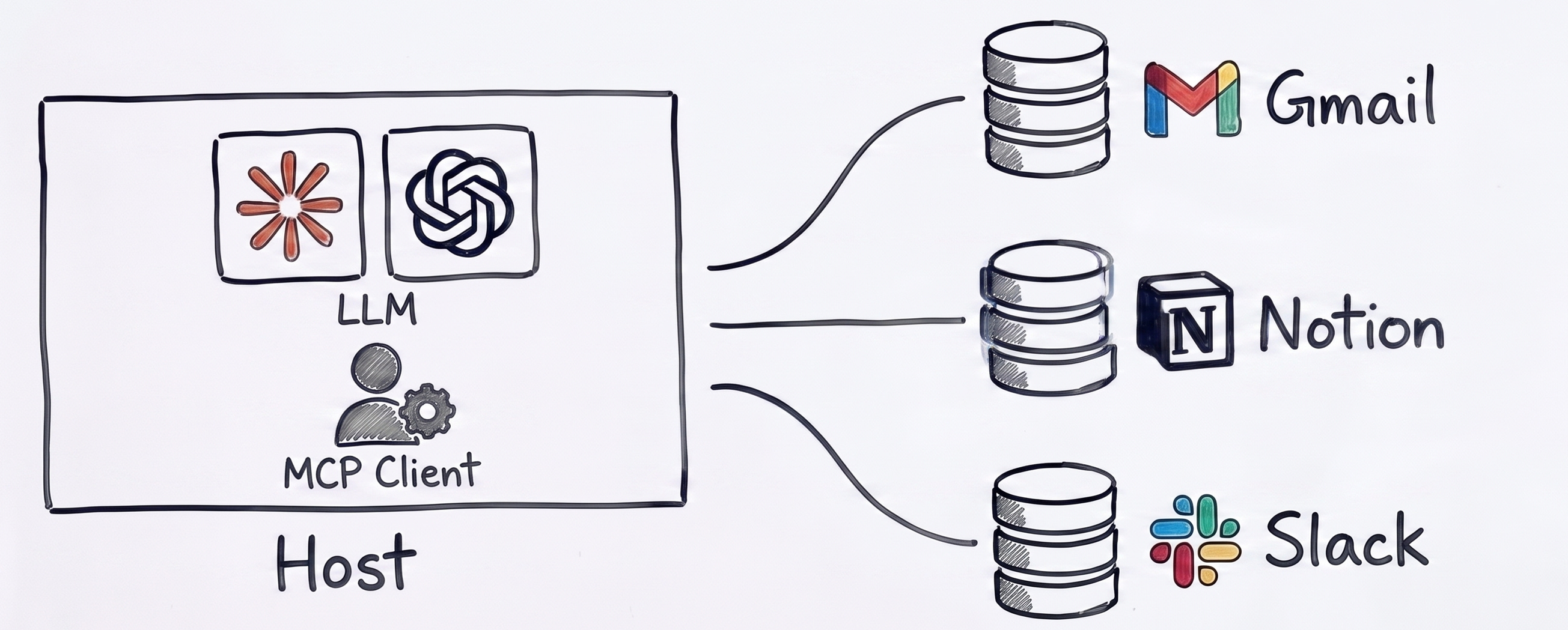
The Host: This is the AI application you’re already using, like Claude Desktop. It’s the “room” where the conversation happens. The host is responsible for managing the connections and keeping things secure.
The Client: Think of it as the translator sitting between your AI and the outside world. When your AI needs to do something external (search for a flight, read a file, check your email), the client handles the handshake behind the scenes.
The Server: This is where the actual functionality lives. An MCP Server is a small program that knows how to do one specific thing really well: read your Google Calendar, access files on your computer, or run a web search.
That’s it. Host → Client → Server → Outside World.
The beauty is the standardization. Once your AI knows how to speak MCP, connecting a new server is like plugging in a USB device. The protocol is the same every time; only the functionality changes.
💡 You can also use MCP in Claude Code by typing
/mcpin terminal. If you are not sure how to start with Claude Code, check out my No-BS Claude Code series: Claude Code for Beginners, Subagents, and Agent Teams.
Real-World MCP Use Cases: Email, Calendar, Files, and More
Here are the kinds of things practical MCP Servers already exist for (among many):
Email: Connect a Gmail MCP Server to let your AI search your inbox, summarize recent emails, or draft replies based on your actual messages. We will see this in action in a bit.
Calendar: Connect a Google Calendar server so you can ask, “What does my week look like?” and get a real-time answer.
Files: Connect a filesystem server. Your AI can read, search, and reference files on your local machine; highly useful for working with massive project files or personal notes.
Web Search: Connect a web search server to look things up in real-time.
Databases: For the more technical readers, there are MCP Servers for Supabase, SQLite, and others, allowing your AI to query actual production data.
Github: This one is very useful, especially if you are a developer or team lead. You connect to Github MCP and ask “How many pull requests are open in all of my repositories?” then you are able to track these PRs easily.
How to Set Up MCP on Claude Desktop Today under 2 minutes
When MCP first launched, connecting a server meant opening your terminal, editing JSON configuration files, and managing Node.js dependencies. It was still custom setup, which locked a lot of non-technical users out of the ecosystem.
That is no longer true. As of early 2026, the barrier to entry has vanished. You don’t need to touch a config file, and you can now use MCP on both the desktop app and the web.
Here is how you actually set it up in your Claude Desktop.
💡 Claude Desktop is available for both Mac and Windows.
Claude Desktop Setup
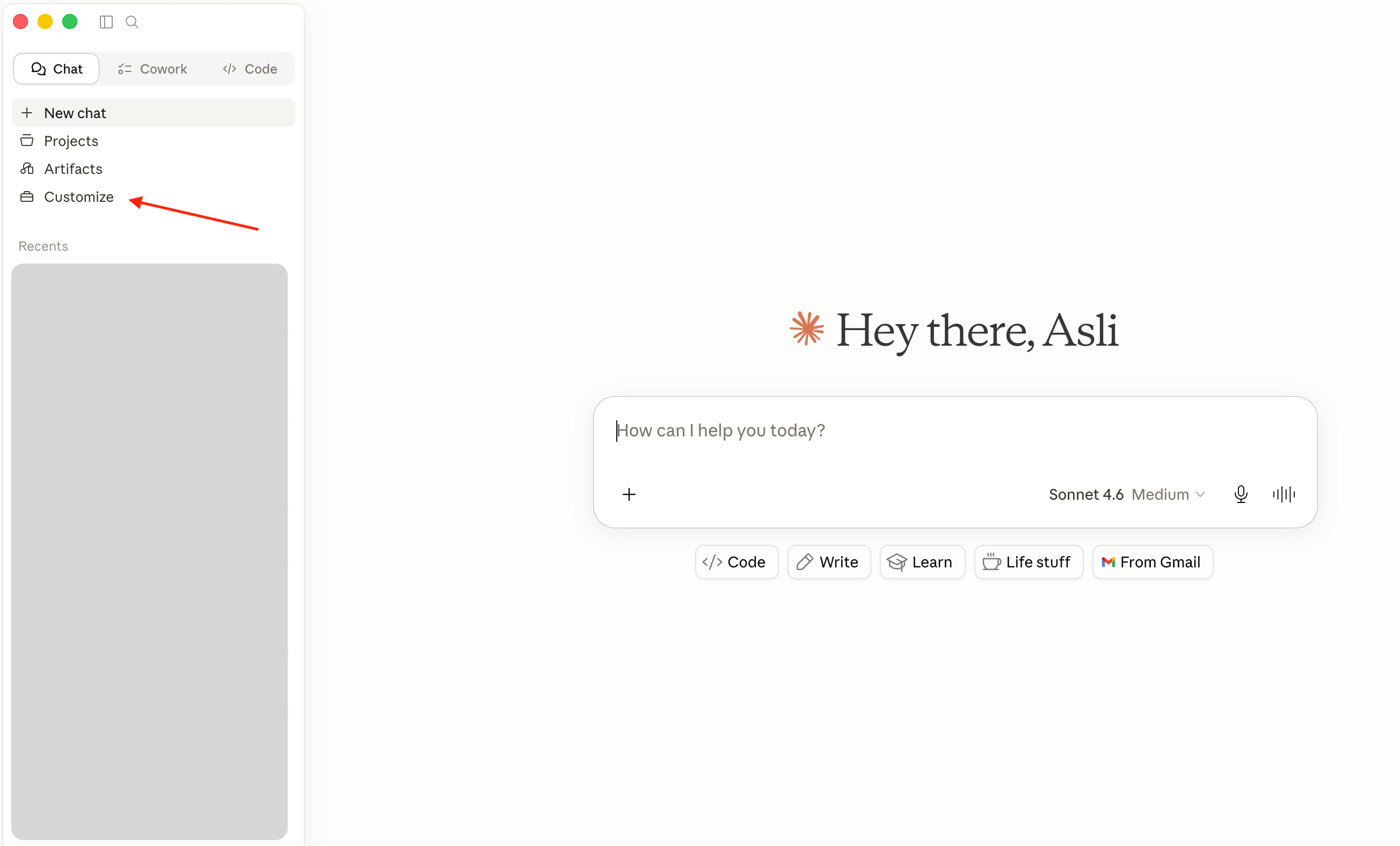
Open Claude Desktop and navigate to Customize > Connectors. Then click Connect your apps.
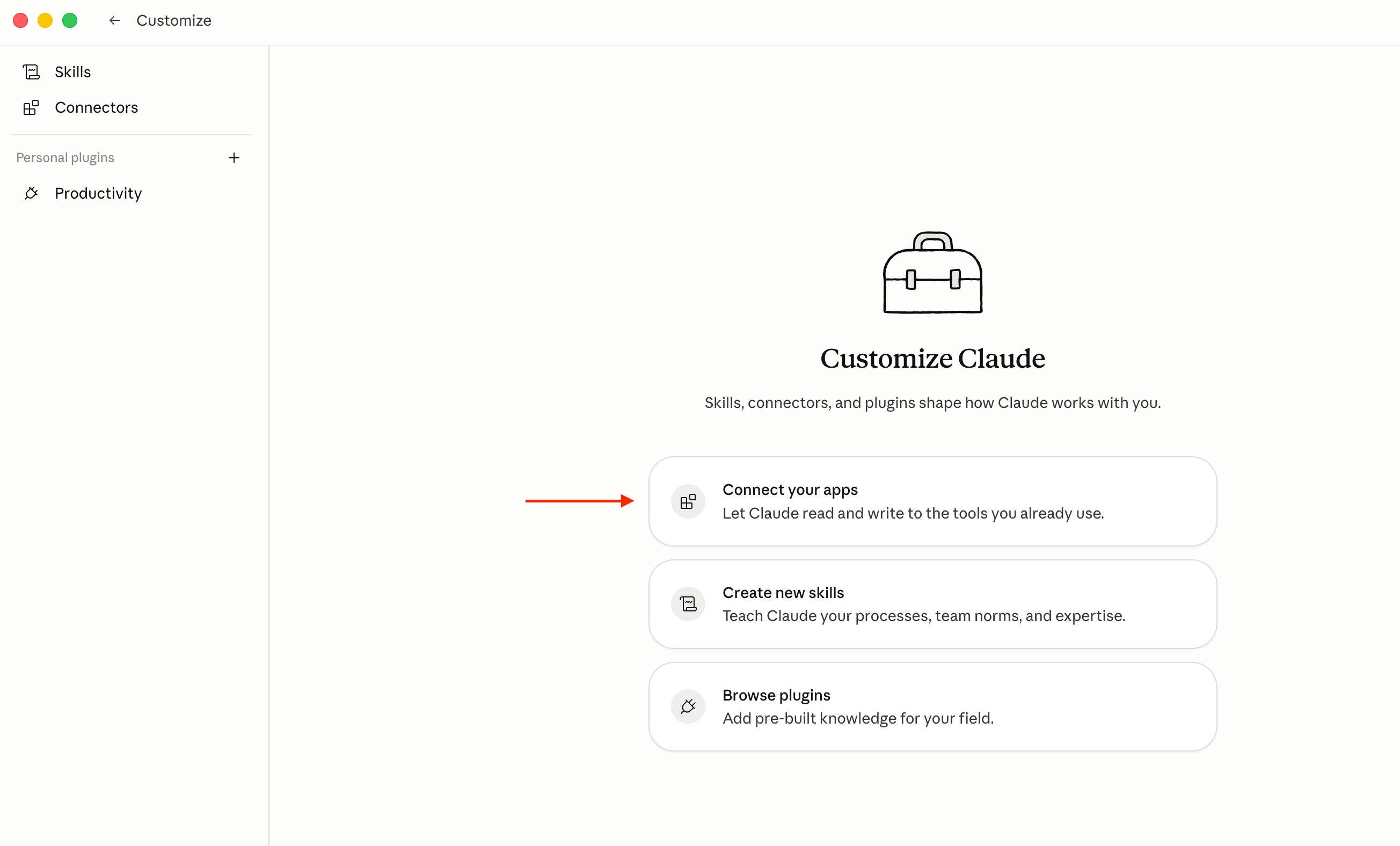
Browse the catalogue. You’ll find a curated directory of pre-built remote connectors for tools like Google Drive, GitHub, Slack, Notion, etc. Let’s add Gmail MCP.
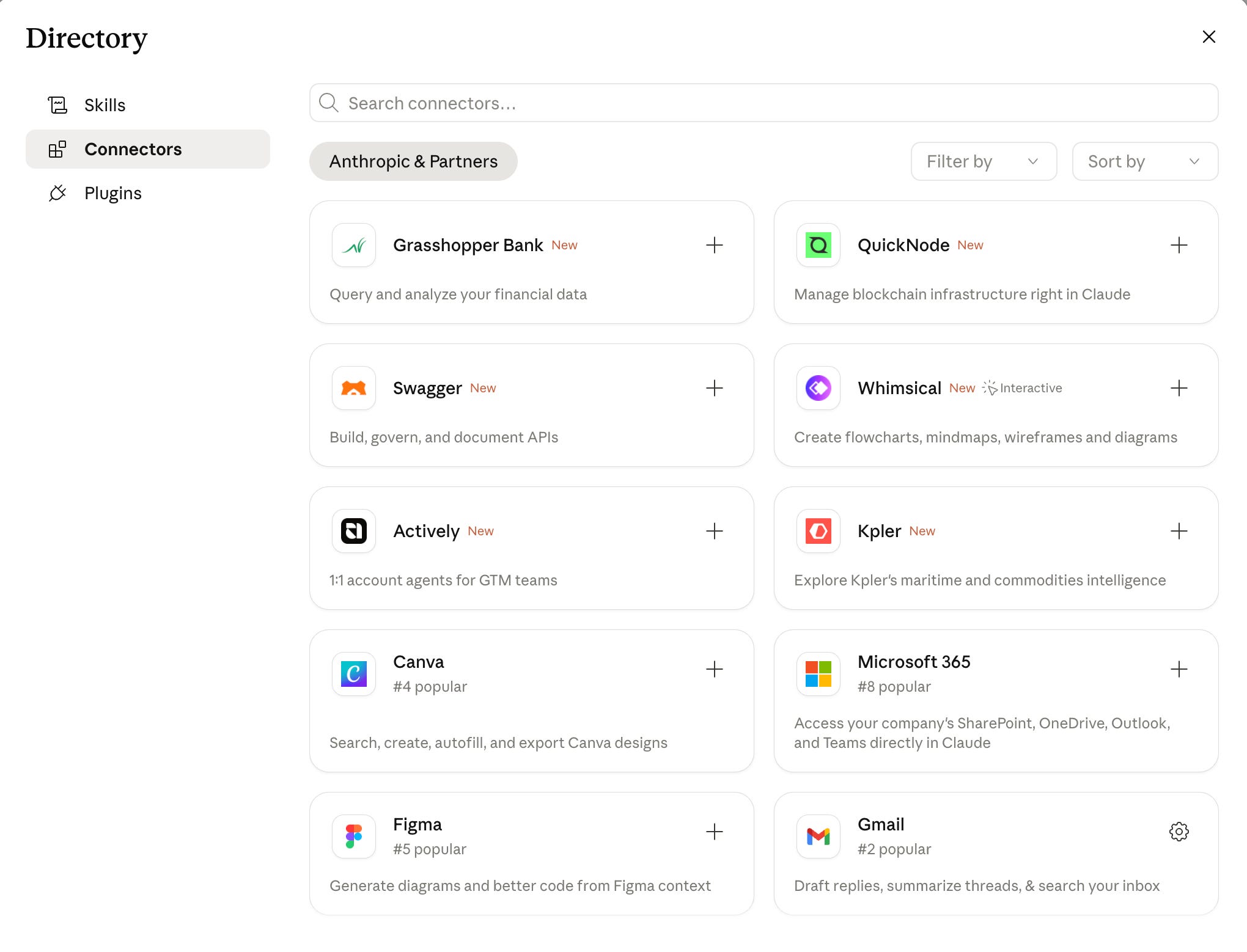
Click to add. You’ll go through a standard secure login (OAuth, exactly like clicking “Sign in with Google”).
Once authenticated, Claude can read and reference to your Gmail account.
💡 Claude MCP Connectors are also available on free plan, but free users are limited to one custom connector.
Let’s quickly test it to see how Gmail MCP works. Instead of checking my own Gmail account, I asked Claude to tell me which email is the most important one in the last 2 weeks that I should pay attention. Try it yourself:
what is the most important email that i should pay attention in the last 2 weeks?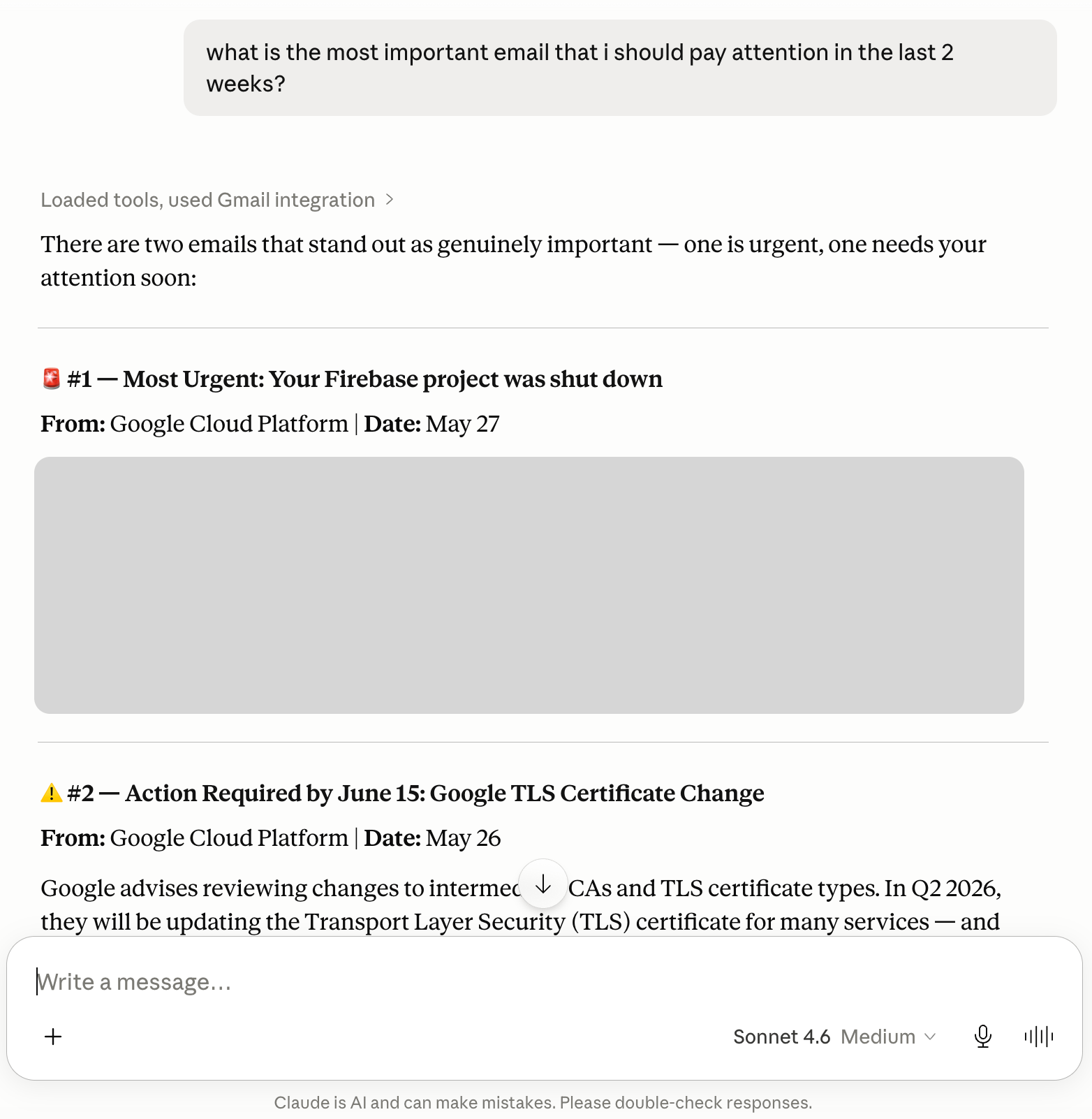
💡 If you give enough permission, Claude + Gmail MCP can help you generate draft, cleanup your inbox, summarize your emails, label them, etc.
MCP Security and Privacy: What to Watch Out For
MCP is powerful, but giving an agentic system access to your physical machine comes with real operational security considerations.
Privacy: When you connect an MCP Server, you are giving your AI access to real data. Do not connect your entire root filesystem “just to see what happens”. Start with a single, specific folder.
Permissions: Each MCP Server has its own permission model. Some are read-only; others can create, edit, or delete things. Always read the documentation to check what a server can actually execute.
Trust Boundaries: Not every MCP Server is created by a company you know. Apply “The Skeptic’s Rule”: if you wouldn’t install a random executable on your machine without checking who made it, don’t connect a random MCP Server to your AI.
You can get help from AI if you are unsure:
I’m considering connecting the [server name] MCP Server.
Based on its documentation at [URL], what data does it access,
what permissions does it need, and what are the privacy implications I should consider?
(Paste the server’s README into the chat along with this prompt before installing).
💡 The Golden Rule: Start narrow, expand slowly. Connect one server. Use it for a week. Understand what data flows where. Then add another.
The July 2026 MCP Update: What's Changing and Why It Matters
The protocol is evolving rapidly, and the biggest update since its launch drops on July 28, 2026.
The core architectural shift is that MCP is now stateless at the protocol layer. Which means: servers no longer need to remember who you are between requests. This means MCP tools can now run at scale on standard internet infrastructure instead of requiring highly specialized, persistent setups, making the ecosystem cheaper and significantly more reliable for everyone.
This release also introduces two major official extensions:
MCP Apps: AI tools can now render actual interactive UI components directly inside your AI client, breaking us out of the strictly text-response paradigm.
Tasks: A massive upgrade for agent orchestration, allowing the protocol to handle long-running jobs that are too complex to finish in a single API call.
Finally, they’ve did some changes in the enterprise side of things. Authorization has been hardened to align with OAuth and OpenID Connect (the standard behind “Sign in with Google”). Crucially for developers, there is now a formal deprecation policy; meaning the protocol can continue to evolve without silently breaking the pipelines and custom tools we’ve already built.
From Conversationalist to Assistant: What MCP Changes About AI
Without MCP, your AI is a conversationalist. Smart, well-read, but ultimately disconnected from your actual life. With MCP, your AI becomes an actual assistant - one that can check your schedule, read your documentation, run long orchestration tasks, and execute real workflows instead of just guessing.
The ecosystem is expanding, and the barrier to entry is getting lower every month. Your job isn’t to connect everything; your job is to connect the right things, thoughtfully.
Which part clicked for you? Or which part still feels fuzzy? Drop it below; your question might be the next article!
PS: If you're new here and wondering why a software engineer is writing about all this - here's why I started Becoming with AI."