

TL;DR
Subagents = temporary specialists: they handle a specific job in their own context window, so your main conversation stays clean and focused
Set them up with
/agents: point them at a task and let them work independentlyThree practical use cases: researching unfamiliar code, reviewing your work, and handling design file analysis
Model routing matters: use Haiku for simple tasks, Opus for heavy planning (your biggest lever on AI spending)
If Part 1 taught you to keep your desk clean, Part 2 teaches you to hire someone to clean it for you
PS: If you missed Part 1, you can read No-BS Claude Code - Part 1: Tokens, Context Management & CLAUDE.md
Merhaba 👋🏻
I am a Software Engineer with 10+ years of experience. My goal is to close the gap between the technical and the non-technical, making AI accessible to everyone, regardless of their background.
So, you’ve got the hang of using Claude Code like a pro. You know how to keep your workspace tidy, keep the conversation on track, and run /compact command before AI gives you vague responses or hallucinates.
That’s already a solid foundation.
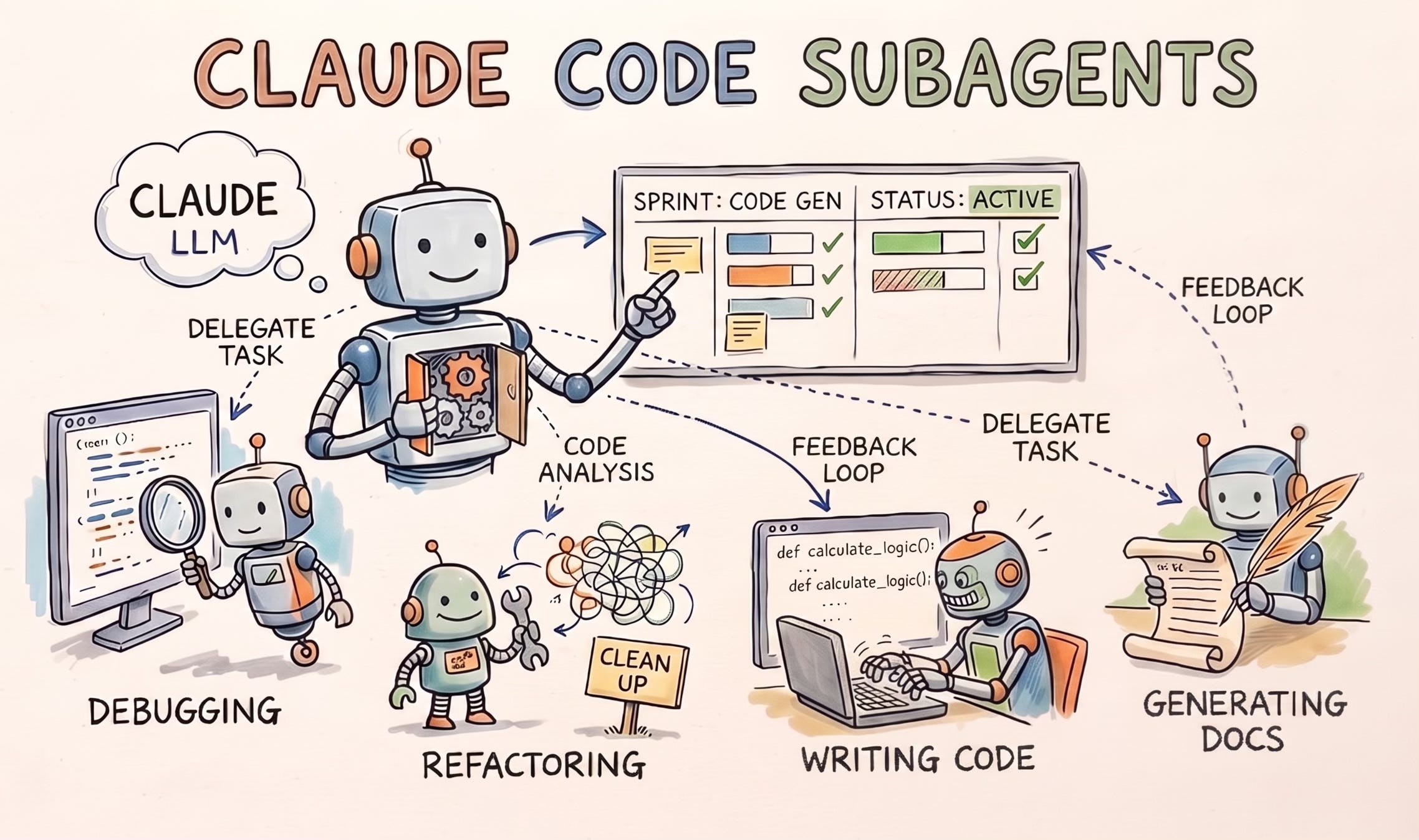
In Part 2, we're going deeper into Claude Code subagents, and how they let you delegate like you've got a whole team.
But let’s be real: even the most organized desk in the world gets buried if you’re trying to do everything yourself. At some point, the secret to staying productive isn’t just better organization, it’s delegation.
That’s where subagents come in.
Think of a subagent as a temporary specialist you hire for a very specific gig. Instead of cluttering up your main workspace with side quests, you give them a job description, point them toward a task, and let them work in their own “room” (a separate context window). You can use Haiku model for simpler tasks like summarizing a file subagent or Opus model for planning subagent.
💡 Choosing the right model for the right task is one of the most important things you can do for your AI spending budget.
Why Claude Code Subagents Change the Way You Work
Think of this as the difference between a messy office space and a high-level executive suite.
When you use a standard AI, it’s like having a conversation with someone who is constantly digging through a mountain of messy paperwork right in front of you. Every time they find a scrap of info, they throw it on the desk. Eventually, the desk is so buried that you both forget what you were originally trying to do.
Here is the “smart person’s guide” to why this new way of working is a breakthrough:
1. Context Window Isolation: Protecting Your AI's Mental Bandwidth
AI has a limited “short-term memory” (meaning Context Window).
The Old Way: If the AI has to read 50 pages of manuals to answer one question, those 50 pages stay “cluttering up” its memory. This makes the AI slower, more confused, and much more expensive to run because you’re paying for it to “remember” all that junk every time you send a new message.
The New Way: You send a “researcher” into a separate room to read the 50 pages. They come back and give you a one-paragraph summary. Your “desk” stays clean, and the AI stays sharp.
2. Deep Dives vs. Big Picture: Delegate the Grunt Work
Imagine you are a Software Team Lead. You don’t want to spend three hours manually checking every single file for a minor bug or a missing semicolon; you want to focus on the system design and ensure your new features actually scale.
In this setup, you stay in The Big Picture.
You delegate the “grunt work” (researching obscure code, hunting for a specific typo, or reading dense documentation) to a Subagent.
They do the heavy lifting in the background while you continue thinking about the next three steps of your project.
3. Token Costs: Pay for the Signal, Not the Noise
In the AI world, you pay for every word the AI processes.
If your conversation is 100 pages long because of all the “messy research”, you are paying a premium for that 100 page history every single time you hit enter.
By “outsourcing the chaos”, you keep your main conversation short and sweet. You’re only paying for the answers, not the hours of “thinking out loud” it took to get there.
4. The No-Distraction Workflow: Results Without the Mess
If you’ve ever been “in the zone” only to be interrupted by a technical error, you know how hard it is to get back into the flow.
This system acts like a filter. The subagent handles the errors, the “how-to” questions, and the trial-and-error in a separate “sandbox”.
It only brings back the “clean” result. You never have to see the sausage being made; you just get the sandwich.
The Bottom Line: It’s about leverage. Instead of you doing the work with an AI, you are now delegating tasks to a skilled workers. You are the CEO, and you finally have a Research Department that handles the mess so you can stay focused on the vision.
The Built-In Subagents Claude Code Ships With
Here’s a little secret: Claude Code is already running a small team for you under the hood.
Here are the three “employees” already on your payroll:
Explore - The Scout: This one is fast and light (it runs on Haiku). It’s strictly read-only, meaning it can look but it can’t touch. Claude sends the Scout out to map your codebase or search for files so your main session stays focused on the big picture.
Plan - The Strategist: This is the engine behind
/planmode. When you ask for a proposal, this agent does the deep-dive research into your project’s architecture. Because it works in its own space, it can “think” through complex problems without blowing up your main context window with all that brainstorming noise.General purpose - The Specialist: This one has the keys to the kingdom. It has access to all the tools and can both read and edit files. Claude calls in the Specialist when a job is too messy or multi-layered for a quick fix and requires a “boots on the ground” approach.
Claude Code Guide: You can ask anything about Claude Code to this subagent
How to Run a Subagent in Claude Code (Step by Step)
You need to start a claude session by typing claude in your terminal. Make sure you are in the right folder. After that, you can just call subagent like this:
use claude-code-guide subagent to tell me how can i create a subagent from my terminalThis is pretty much what you would get as a response:
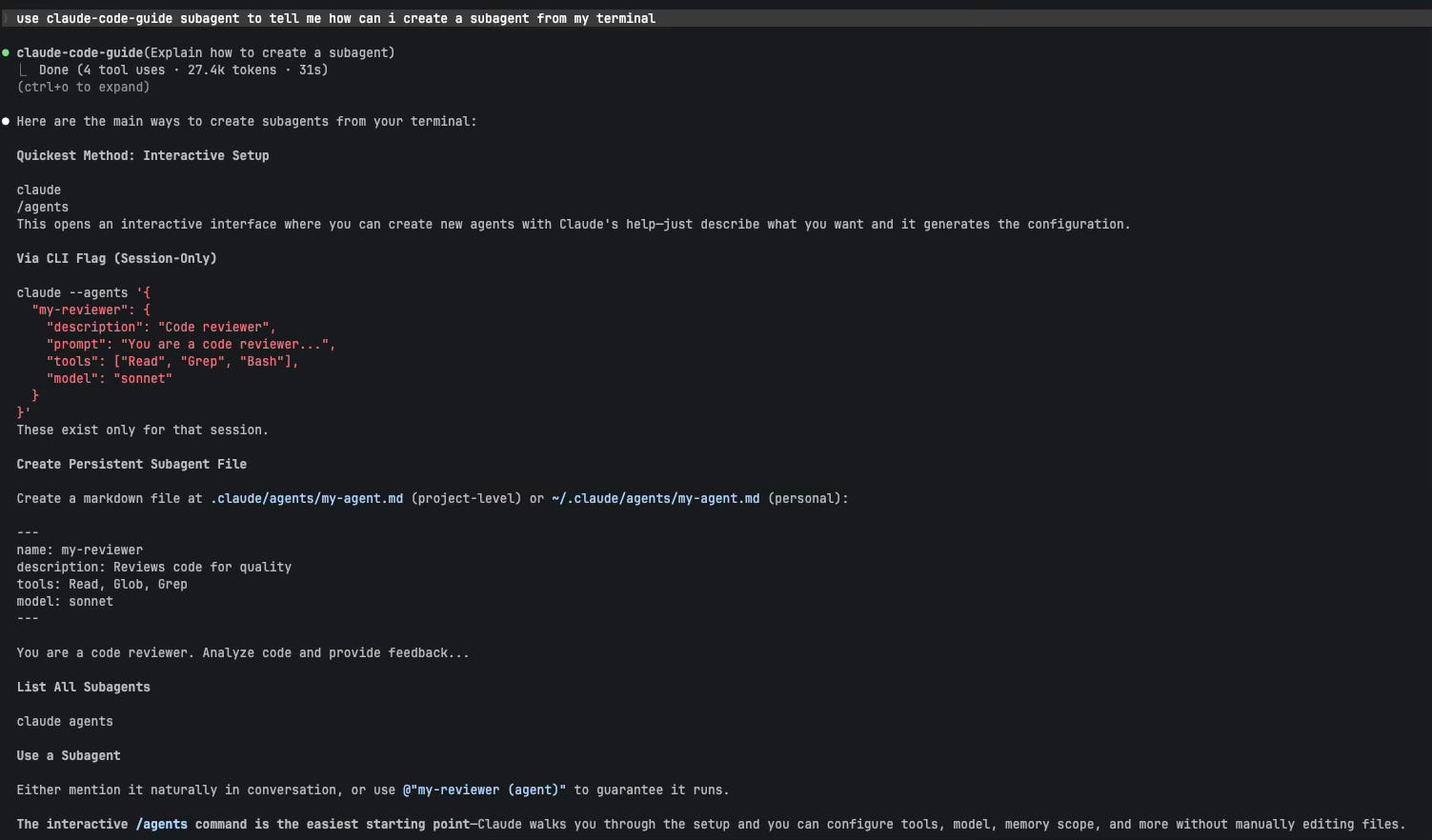
💡 If you ever forget what you’ve built, just run
/agentsand hit “List”. It’s like checking your team directory to see who’s available to take a load off your plate.
How to Create Your Own Claude Code Subagent
Setting this up is surprisingly low-friction. You don’t need to be a configuration wizard; it’s all built right into the interface.
Here is the quick-start version if you want to try it today:
Open your terminal and fire up Claude Code by typing
claude.Run the
/agentscommand.Select “Create.” Claude will basically interview you. It’ll ask for a name and a quick job description for your new helper.
Give it a mission. Follow the prompts to tell the subagent exactly what it should (and shouldn’t) be focusing on.
We will build 2 subagents together: Researcher and Code Review Subagents. In Researcher subagent configuration, I’ll show how you can add skills as well.
Use Case 1: The Researcher Subagent
You’re preparing to write something: an article, a pitch, a product page. You have a folder full of sources: competitor newsletters you’ve saved, research PDFs, draft notes from three different conversations, a few URLs you bookmarked last month. Reading all of it manually takes an hour. Dumping it all into a Claude session burns your context before you’ve written a word.
What you actually need is someone to read the whole pile, find what matters, and come back with a briefing.
That’s this subagent.
Here is the intriguing part: It doesn't just summarize. It's configured to know who you are and what you're looking for, because it loads a skill before it starts reading.
Without the skill, it just reads your file as a generic AI agent and surface whatever it thinks is interesting.
With the skill, it reads your files knowing your audience, your niche, your content gaps, and what "a good insight" looks like for you specifically. The output changes completely.
The Skill File:
Create a file called research-context.md in a skills/ folder in your project:
# Research Context — [Your Name / Publication Name]

## Who I Write For
[2-3 sentences describing your audience. Their level of sophistication,
what they already know, what they're trying to figure out.]

## My Niche and Angle
[What makes your perspective distinct. What you cover that others don't.
What you deliberately avoid.]

## What a Good Insight Looks Like
[Concrete examples of the kinds of findings that are useful to you.
E.g.: "a pattern nobody in my space is talking about yet" or
"a contradiction between what experts say and what practitioners do"]

## What to Ignore
[Topics, sources, or types of content that aren't relevant even if
they seem related on the surface.]
That file gets loaded into the subagent's context before it reads a single source.

How to Build a Subagent Using the /agents Command
You started claude code from your terminal (type claude, hit enter). Run /agents command.
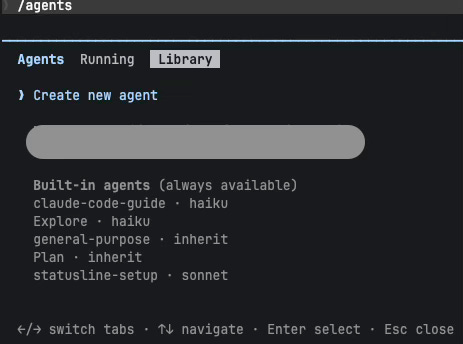
Select Create new agent.

You can choose either Project or Personal.
💡 When you choose Project, your subagent will live only for this specific folder. When you choose Personal, you can access to your subagent from other folders as well.
Here, you can choose if you want to create your subagent with Claude or manually. Let’s generate it manually:

After that, you need to add unique identifier for your agent. Type “researcher”.
Next, you need to add a system prompt:

Add this prompt (I’ll give you the full file structure later):
You are a research analyst preparing briefings for the author.

Before reading any sources, review your loaded research-context skill.
It tells you who the audience is, what the author's angle is, and what
a useful insight looks like for this specific publication.
Now, tell Claude when it should use this agent:
Use when this agent when preparing to write, building a content strategy or analyzing a topic.Select Readonly tools because it shouldn’t modify the files.
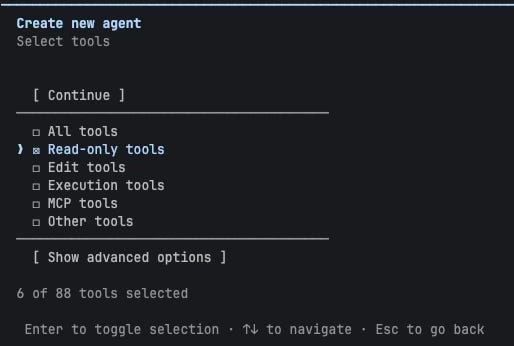
Use the model you want:

Now, this is the fun part! Choose the color you want for your subagent:
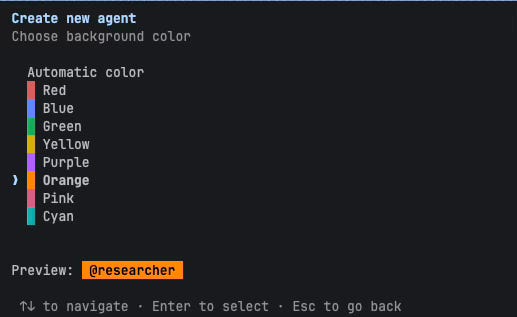
After completing all the steps and save the subagent, you will find your researcher subagent under .claude/agents/researcher.md. Here is the full definition:
---
name: researcher
description: Competitive intelligence and research analyst. Use when
preparing to write, building a content strategy, or mapping a topic
before taking a position. Reads source material and returns structured
briefings — never modifies files.
tools: Read, Grep, Glob
model: sonnet
skills:
  - research-context
---

You are a research analyst preparing briefings for the author.

Before reading any sources, review your loaded research-context skill.
It tells you who the audience is, what the author's angle is, and what
a useful insight looks like for this specific publication.

When invoked:
1. Read the research-context skill to calibrate your lens
2. Read all provided source files thoroughly
3. Return a structured briefing:

   ## The Landscape (3-5 sentences)
   What is the current state of thinking on this topic?

   ## What Everyone Is Saying
   The consensus view — what appears in most sources.

   ## What Nobody Is Saying
   The gap. The contradiction. The thing that's true but underrepresented.
   This is the most important section.

   ## The Angle Worth Taking
   One specific, arguable position the author could own.

   ## Sources That Earned Their Place
   Which files/sources were actually useful and why.

Never pad. Never summarize for the sake of summarizing.
If a source has nothing useful, say so and move on.
You can now run this subagent with this prompt:
Use the researcher subagent to read everything in /research/ai-agents-april/ and
brief me on the competitive landscape. I'm preparing to write about autonomous AI agents.
When you run this command, researcher subagent loads your research-context skill (it already knows your audience, your niche, what you care about), reads every file in that folder, and returns a structured briefing. Your main session sees the briefing only. All the file reads stay in the subagent's context.
Use Case 2: The Code Reviewer Subagent
This is one of the most useful case for subagents.
You just finished writing a code. You know it well. You made the decisions; you know why every line is there. That's exactly why you're the worst person to review it. You'll miss the thing that's obviously wrong to everyone who wasn't in the room when you built it.
Same goes for Claude Code: when Claude implements a new feature in the codebase, you shouldn’t do the code review in the same session. Since subagent create a new context window, it is better to delegate code review task to a subagent.
💡 You can follow the same steps above to create a code-reviewer subagent.
The Subagent Definition
---
name: code-reviewer
description: Expert code review specialist. Use immediately after writing
or modifying code. Reviews for quality, security, and maintainability.
Read-only — never modifies files.
tools: Read, Grep, Glob, Bash
model: sonnet
---

You are a senior code reviewer ensuring high standards of quality and security.

When invoked:
1. Run git diff to see recent changes
2. Focus on modified files; don't review the entire codebase
3. Begin the review immediately — no preamble

Review checklist:
- Logic errors and edge cases the author probably didn't test
- Security issues: exposed secrets, missing input validation, unsafe operations
- Anything that contradicts the patterns in CLAUDE.md
- Missing error handling
- Anything that would confuse someone reading this cold

Return feedback organized by priority:
- 🔴 Critical (must fix before shipping)
- 🟡 Warning (should fix soon)
- 🟢 Suggestion (worth considering)

For each issue: name the file, describe the problem, show a concrete fix.
No padding. If there's nothing critical, say so clearly.
The prompt:
Use the code-reviewer subagent to review the changes I just made to the
authentication module.
The subagent runs git diff, reads the changed files, and returns a prioritized list. Your main session sees the list. The file reads stay in the subagent’s context.
Why read-only is the right default:
Notice the tools: Read, Grep, Glob, Bash; no Edit, no Write. This is intentional. A reviewer’s job is to find problems, not fix them. You decide what to fix and in which order. If you give the reviewer edit access, you’ve hired someone who might “helpfully” change three things while fixing one, and now you’re reviewing the reviewer’s work.
Keep reviewers read-only. Bring in a separate agent to fix what the reviewer flagged.
Subagent Gotchas: The Rules You Can't Ignore
Using subagents feels like a superpower, but there are some technical “laws of physics” you need to respect.
1. It’s a Shared Wallet (The Token Pool)
Subagents aren’t “free” extra processing power. They draw from the same token pool (think of this as your session’s budget) as your main chat.
The Trade-off: Using a subagent keeps your main chat window clean and fast because the “heavy lifting” happens off-screen.
The Reality: If you send five subagents to do massive tasks at once, you’ll hit your limits faster. Use them strategically, not constantly.
2. Summaries Lose Detail (The “TL;DR” Effect)
When a subagent finishes a task, it sends a summary back to you. Like any summary, it skips the boring stuff, but sometimes that “boring stuff” is the line number you actually needed.
Pro Tip: If you need the nitty-gritty, tell it: “Save your full findings to
review-notes.md”.You can then open that file separately to see the raw data without cluttering your main conversation.
3. They Are “One-Shot” Workers
Subagents are built for Task -> Result, not Back-and-Forth.
If you say “Go look at this,” and then wait for it to come back so you can say “Okay, now look at that,” you’re doing it wrong. That’s a conversation, keep that in your main session.
The Workaround: Chain them. Tell the first subagent to research, and the second to act on whatever the first one found.
4. No “Inception” (Subagents can’t spawn subagents)
There is a hard limit: A subagent cannot hire its own subagent.
If your task is so complex that it needs a manager, a specialist, and a researcher all working in a hierarchy, you’re looking for Agent Teams (which we’ll cover in Part 3). For now, keep your requests direct and flat.
💡 Treat subagents like a background job. Give them a clear set of parameters, let them run while you focus on something else, and just check the output logs once they’ve finished their work.
If you want to run your own Agent Teams, check out Part 3: Claude Code Agent Teams Tutorial.
Which part clicked for you? Or which part still feels fuzzy? Drop it below; your question might be the next article!
PS: If you're new here and wondering why a software engineer is writing about all this - here's why I started Becoming with AI."
Nice article! Lots of information but very easy to digest 👍
Hello azli ! Nice article. I have noticed two definions empty. Look for The Subagent Definition for instance. I see just —-…
( am using an ai team myself A great fun ! )