

TL;DR;
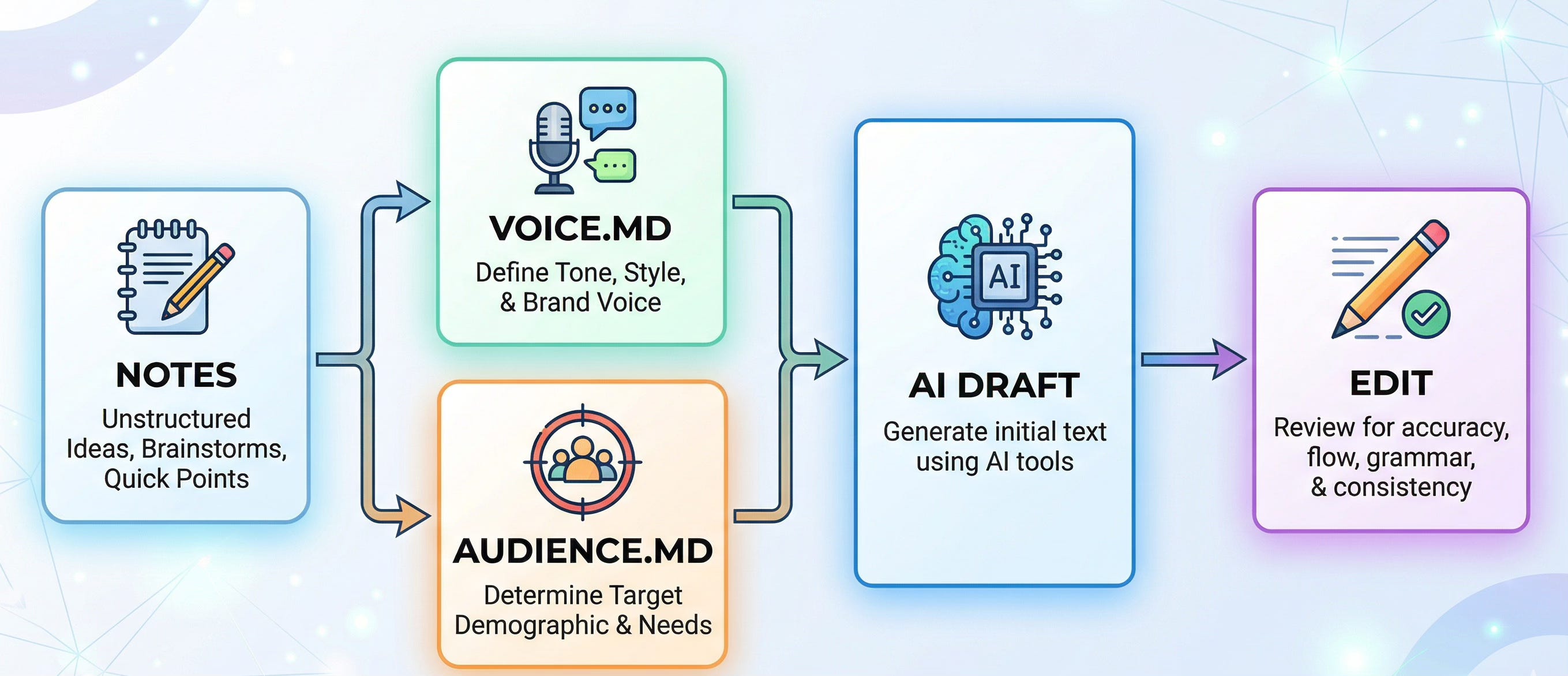
The blank page is a creative energy killer, especially when you’re trying to maintain a specific voice. I built an AI writing workflow using Cowork that turns messy notes into structured first drafts by pulling from two living documents:
voice.md(how I sound) and
audience.md(who I’m talking to).You can learn more about How to Use Claude Cowork to Build Your AI Digital Twin.
Welcome👋🏻
I am a Software Engineer with 10+ years of experience. My goal is to close the gap between the technical and the non-technical, making AI accessible to everyone, regardless of their background.
Earlier today, I was looking at a single bullet point in my Notes app and a voice memo I recorded while walking in the park. In my head, the idea was great. On the screen, it was a mess.
The problem isn’t the idea. It’s the gap between a “messy thought” and a “polished draft”.
For my newsletter, Becoming with AI, my subscribers aren’t looking for technical jargon. They want clarity and a human connection. But after 10+ years as a software engineer, my brain defaults to tech speak. When I try to fix it, I overcorrect into “generic robot”. Neither is my actual voice.
The Real AI Writing Problem: It's Not Ideas, It's Translation
Let me be specific about what was actually happening. I never struggled with having something to say. The struggle was translating a messy idea into a draft that matched the tone I’d spent months developing.
Every time I sat down, I was doing two jobs at once:
Figuring out what to say (the content)
Figuring out how to say it (the voice)
Doing both simultaneously is exhausting. It’s like trying to build furniture and paint it at the same time. You end up with a sticky mess.
What I needed was a way to separate those two tasks. Get the “how to say it” part handled well enough that I could focus entirely on “what to say”.
My AI Writing Workflow System: voice.md + audience.md
Here’s what I built.
The core of it is a Claude Cowork workflow that pulls from two files I maintain and update regularly. These aren’t static instruction files you write once and forget about. They’re living documents that evolve as the newsletter grows.
voice.md: A profile of my rhythm, vocabulary, and structural patterns. It includes real examples of what I actually wrote.audience.md: A profile of who I'm writing for. Their experience level, what they care about, what confuses them, the language they use, and what they're actually trying to accomplish when they read my stuff.
When I have an idea, even if it’s just a few scattered bullet points or a messy paragraph of thoughts, I drop it into the Cowork. Then Cowork pulls from both files and produces a structured draft that matches my “human-first” vibe.
That's it. The output isn't a finished article. It's a first draft that sounds like me instead of sounding like a chatbot wearing my hat.
Why Showing AI Real Examples Beats Any Style Guide
Most people try to “describe” their voice to AI:
“Write in a warm, conversational tone”.
The AI nods, then produces a generic post that sounds like every "Thought Leader" on your feed.
I've found that showing AI real examples works far better than any style guide you could write. So instead of instructions, I give it evidence. My voice.md file isn't a list of adjectives about my tone. It's full of actual patterns pulled from actual articles I've written. Specific sentence structures. Real examples of my rhythm. The exact words I reach for and the exact words I avoid.
The difference is night and day. When you tell an AI “be warm but direct”, you get generic warmth. When you show it fifteen examples of what your version of warm-but-direct looks like in practice, you get something that actually sounds like you sat down and wrote it.
Try out this today:
Open your 3-5 most recent pieces of writing (articles, emails, whatever you’re proud of).
Copy 5-10 sentences from each that really sound like you. The ones where you’d say “yeah, that’s my voice”.
Paste them into a new document and look for patterns. Do you use short sentences for emphasis? Do you reach for metaphors? Do you start with stories or with statements?
Write those patterns down as observations, not instructions. “I tend to follow a long explanation with a short punchy sentence” is better than “use short sentences sometimes.”
Save that document. That’s the beginning of your
voice.md.
How to Build Your voice.md File (Step by Step)
Here's a starting point you can steal and adapt:
Sentence Rhythm: [Describe the pattern. Short then long? Long then short? Do you use fragments? Single sentence paragraphs?]

Vocabulary: [Words you actually use. Words you never use. Do you reach for metaphors or stay literal? Do you use jargon or translate everything?]

Structure: [How do you open articles? How do you close them? Do you use lists, subheadings, both?]

Tone: [Not adjectives. Examples. Paste 3-5 sentences that capture your exact tone.]

Things I Never Do: [This is actually the most useful section. Knowing what to avoid is more actionable than knowing what to aim for.]

Real Examples: [Paste 10-15 of your best sentences. The ones that really sound like you. This is the evidence the AI needs.]
The Things I Never Do section is where a lot of the magic happens. For me, that includes things like: “I don’t prefer to use em-dashes for dramatic effect, I never open with rhetorical questions, I never use words like ‘harness’ or ‘landscape’ or ‘delve’”, etc.
Constraints are more useful than aspirations when you're teaching a system to mimic your voice.
How to Build Your audience.md File
Your voice file tells the AI how you sound. Your audience file tells it who you’re talking to. Both matter.
Here is the starting point you can steal:
Who they are: [Job titles, experience level, what they know, what they don’t]
What they’re trying to do: [Not “learn about AI”. Be specific. “Figure out how to use AI at work to increase productivity.”]
What frustrates them: [What have they tried that didn’t work? What makes them feel lost?]
Language they use: [How do they describe their own problems?]
What they don’t need: [Technical depth? Hype? Knowing what to skip is as important as knowing what to include.]
For Becoming with AI, my audience is non-technical but intellectually curious. They don't need to understand how something works under the hood. They need to be able to do something useful in 20 minutes.

That single insight shapes every draft the workflow produces.
The Exact AI Writing Prompt I Use (Copy This)
Put your voice.md and audience.md file into a folder called, let’s say, “AI Cowriter”. Add your notes to notes.md file and put it into the same folder. We will let Claude Cowork do the rest for us.
Here’s the exact prompt structure I use when I drop my messy notes into the workflow:
I'm writing an article for my newsletter 'Becoming with AI'.
Read all files in this folder carefully before you start:
voice.md: how the writing should sound
audience.md: who my audience is
notes.md: my notes on a Substack article

Produce a structured first draft with:

- A TL;DR section at the top
- Clear subheadings for each major section
- Practical prompts, templates, or step-by-step guidance wherever I'm describing a process
- A closing section that connects the practical to the personal

This is a first draft, not a final piece. Prioritize getting the voice and structure right. I'll handle the sharpening.
That last line matters. It sets the expectation correctly; for me and for the AI.
This isn't about generating a finished article. It's about getting past the blank page with something that already feels like mine.
What This AI Workflow Actually Changed (Not What I Expected)
The impact has been huge for my creative energy, but probably not in the way you’d expect.
The “blank page” problem is mostly gone. That’s real. I’m no longer starting from zero, fighting with a blinking cursor for thirty minutes before I have anything usable. Instead, I sit down and I’m immediately in editor mode; sharpening, rearranging, adding the details only I can add. That’s a completely different kind of creative work. It’s energizing instead of draining.
But here’s the part that surprised me.
This is definitely not a “set it and forget it” system.
The quality of the draft depends entirely on how much effort I put into updating those two files. If I write a great article and don’t pull the best patterns from it back into voice.md, the next draft will be slightly less “me”. If my audience evolves and I don’t update audience.md, the framing starts to drift.
And that actually keeps me more connected to my own writing process. Not less. I’m constantly asking myself: “What worked about that piece? Why did that paragraph land? What would my readers actually need here?”
Those are exactly the questions a writer should be asking. The system forces the reflection.
The Human Element
I want to be honest about something. When I first started building this, there was a part of me that felt weird about it. Like I was outsourcing something that should be purely mine.
But here’s what I’ve come to understand: the AI isn’t writing for me. It’s giving me a running start. Every draft still needs my eyes, my judgment, my experience, my willingness to cut the stuff that sounds right but isn’t true. The messy notes are mine. The voice profile is built from my actual writing. The audience profile comes from real conversations with real readers.
The system doesn’t replace the human work. It moves where the human work happens. Instead of spending my energy on the mechanical translation from “messy idea” to “structured draft”, I spend it on the part that actually matters: making the piece honest, useful, and specific.
I’m still the one deciding what to say. The workflow just helps me say it faster in a way that already sounds like me.
And I’m still updating those files. Still refining. Still learning what my voice actually is by paying close enough attention to write it down. That’s the unexpected gift of the whole thing: building the system taught me more about my own writing than years of just doing it.
Which part clicked for you? Or which part still feels fuzzy? Drop it below; your question might be the next article!
PS: If you're new here and wondering why a software engineer is writing about all this - here's why I started Becoming with AI."
When I first learned about how to write with Claude, the benefit I discounted was:
Build it once…
Use it forever!
Haha only if I never change.
Thanks for sharing.
A new subscriber
Bridges Viewpoint