

TL;DR;
We all feel “AI fatigue” from time to time.
By March 2026, the average professional is paying for four or more AI subscriptions; most of which are quietly draining your bank account while doing exactly nothing for your workflow. The fix isn’t “better” tools. It’s building a Minimal AI Stack: the absolute fewest tools required to cover your entire lifecycle of your work, organized into three layers.
Layer 1 - The Brain (Research)
Layer 2 - The Studio (Creation)
Layer 3 - The Hands (Action)
Welcome👋🏻
I am a Software Engineer with 10+ years of experience. My goal is to close the gap between the technical and the non-technical, making AI accessible to everyone, regardless of their background.

If you feel like you are drowning in “productivity”, you aren’t alone.
I’ll be honest with you: I’ve been going through the same digital exhaustion myself lately. Every morning, I wake up to three new “game-changing” newsletters, four “must-have” browser extensions, and a nagging feeling that I’m falling behind. Creating this system, this Minimal Stack, was my way out of the noise. This article isn’t just a guide for you; it’s a necessary reminder for me.
By March 2026, the novelty of AI has worn off, replaced by a persistent, low-grade weight. Your browser probably has thirty tabs open; three different chatbots, a research tool you saw on a reel, two image generators, and a PDF summarizer you’ve used exactly once. You are likely paying for at least four AI subscriptions, most of which are quietly draining your bank account while doing exactly nothing for your actual workflow.
The irony of 2026 is that while AI was promised to save us time, we are spending more time than ever “managing” our tools. We’ve become operators of a digital factory rather than creators of work.
To find our way back, we have to stop collecting tools and start building a System.
Why AI Tool Fatigue Is Costing You Time (and Money)
Before we look at the apps, we have to talk about mindset.
Most people approach AI like a hobby, they “play” with it when a new version drops. To actually get work done, you must treat AI like a hire. If you hired a human assistant and they didn’t show up for work for two weeks, you’d fire them. You should do the same with your AI subscriptions. If a tool hasn’t moved a project toward the finish line in a week or two, it is clutter. It is taking up “mental shelf space”.
To build a minimalist stack, we are going to organize your digital life into three distinct layers:
The Brain: Where you find facts and organize your own information.
The Studio: Where you draft, design, and build the final product.
The Hands: Where you take action or automate the “boring stuff” so you don’t have to click.
Layer 1 - The Brain: How to Research Smarter with Perplexity and NotebookLM
Everything starts with information. But in 2026, the internet is a minefield of AI-generated noise and “slop”. You need a “Brain” that doesn’t just talk, but provides receipts.
The Explorer: Perplexity
Perplexity is the single greatest replacement for the Google Search. We used to search, click a link, realize it was SEO spam, go back, click another link, and repeat.
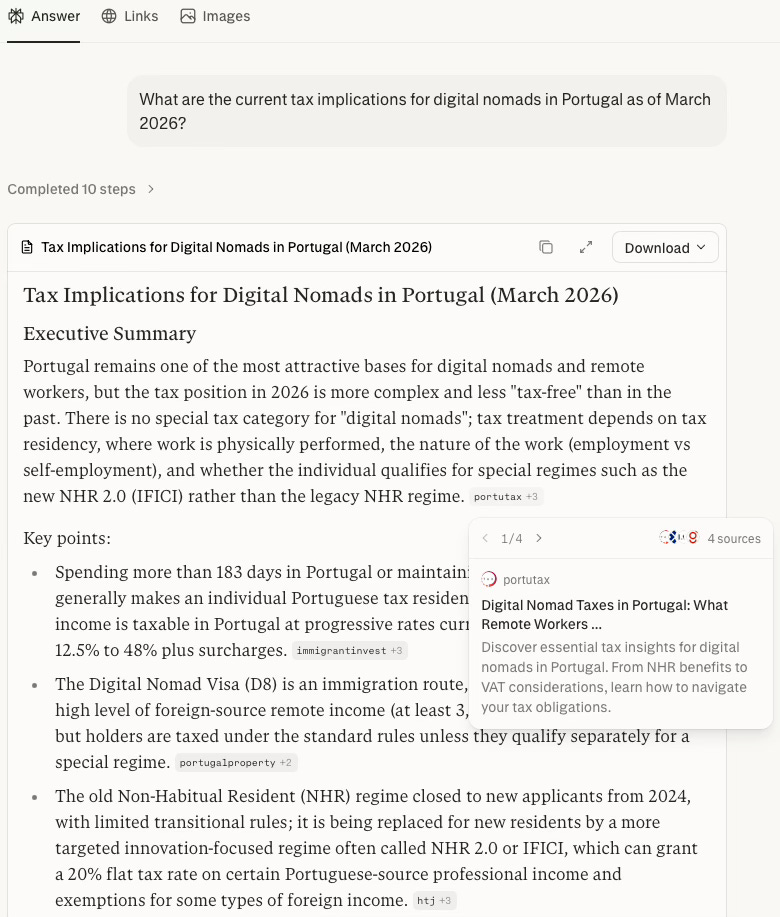
In 2026, Perplexity’s Deep Research does this for you. You ask a complex question; say, “What are the current tax implications for digital nomads in Portugal as of March 2026?”and the AI acts as an agent. It clicks through dozens of sources, reads the fine print, and compiles a cited report.
The Citations Rule: Why Unverifiable AI Is a Liability
In Perplexity, every claim has a footnote. Clicking that takes you directly to the original source. For a professional, this is non-negotiable. If an AI tells you a statistic but can’t show you the source, it might get you into trouble.
The Librarian: NotebookLM
While Perplexity explores the world, NotebookLM organizes your world. It is a private library where the only books on the shelf are the ones you put there.
The 2026 Use Case: You can now upload YouTube links, PDFs, and even voice memos. The Cinematic Video Overview feature can turn several pages of messy notes into a narrated video or a “Deep Dive” podcast where two AI hosts discuss your ideas. You can listen to your own research on your commute. It is the ultimate tool for “internalizing” information rather than just storing it.
Layer 2 - The Studio: Draft Branded Work Faster with Claude Cowork and Gemini
Once you have your facts, you need to produce something. This is where most people get overwhelmed by prompting. In a minimal stack, we move away from chatting and toward Coworking.
Claude (Cowork & Skills)
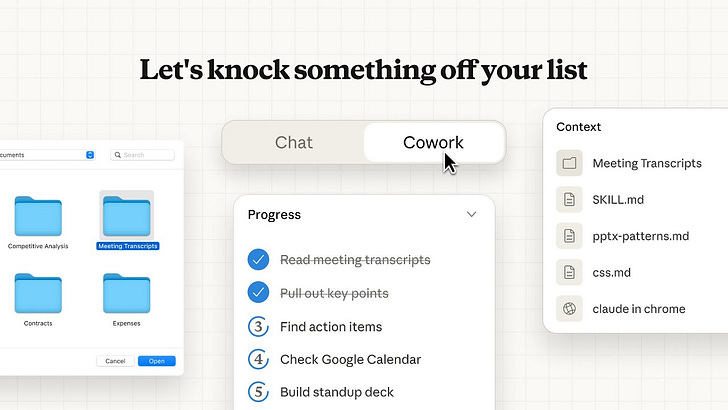
As of early 2026, Claude Cowork is the gold standard for drafting. It isn’t just a chat bot; it’s a dedicated space on your computer where Claude acts as a “Desktop Colleague”.
Teaching Claude a Skill: Your AI Digital Twin
The biggest friction in AI is repeating yourself: “Use my brand colors”, “Keep it professional”, “Use my bio”. In 2026, you teach Claude these as a Skill. You upload your brand guidelines or past work once. From then on, you simply say, “Claude, use my ‘Consultant Skill’ to turn this research into a slide deck”. It handles the fonts, the tone, and the layout automatically.
Claude Code: For the non-technical person who has big ideas, Claude Code is the “Technical Teammate”. You don’t need to know how to code; you just describe the tool you want; like a custom calculator for your clients or a personal dashboard, and Claude builds for you.

The Efficiency Play: Gemini (Google Workspace)
If you live in Google Docs and Gmail, Gemini is your shortcut. It lives in your sidebar, summarizing 100 email threads and drafting responses that align with your actual calendar availability, no switching tabs required. It is the best tool for the “Logistical” side of creation.
Layer 3 - The Hands: Automate Repetitive Tasks with Claude and Zapier
The final layer is Automation. This is the “glue” that connects your Brain to your Studio so you stop being a “Copy Paste” person.

Claude in Chrome
Anthropic has a browser extension called Claude in Chrome that turns Claude from a chatbot that answers questions into an assistant that takes action in your browser. Claude works directly in a side panel while you browse, seeing what you see and taking actions when you ask.
Record a workflow
Think of it like showing a new hire exactly how you do something, once. You perform the steps, Claude watches, and from that point on it can repeat the whole thing without you lifting a finger. Click record, do your thing, stop, save it. That’s your shortcut.
This isn’t about automating complex systems. It’s about getting the ten minute tasks, the ones you do the same way every single time, off your plate for good.
Claude Cowork Scheduler
Cowork's scheduler is the closest thing to hiring an assistant who never forgets. You describe the task once; a weekly competitor roundup, a daily email briefing, a recurring report from your Google Drive and Claude runs it on whatever rhythm you set, delivering a finished output every time.
No reminders, no setup friction, no starting from scratch. But here's the caveat: scheduled tasks only run while your computer is awake and the Claude Desktop app is open. If either is off when the task is due, Cowork skips it and runs it once you're back.
The Connector (Zapier & n8n)
Claude is remarkable at thinking. It reasons, writes, summarizes, and executes tasks on your computer. But it doesn’t live inside your other apps. It can’t watch your inbox and react when something arrives. It doesn’t know when a new row lands in your spreadsheet, when a form gets submitted, or when a Slack message needs routing somewhere else. It just waits for you to show up and ask.
That’s the gap Zapier and n8n fill. They don’t think, but they watch, trigger, and connect. A new lead comes in, a file gets uploaded, a calendar event is created; these tools catch that moment and set the chain in motion, with or without you at the keyboard. At that point, you can bring Claude into the middle of the flow to do the reasoning work. But the trigger, the routing, the delivery to the right destination? That’s Zapier and n8n’s job.
Zapier is the easy to use; prebuilt connections, visual setup, no technical background required. n8n gives you more control and runs cheaper at scale, especially if you’re self-hosting. I haven’t used Zapier, I’ve been trying out n8n, but they are fundamentally doing the similar things: if you want automation that runs while you sleep, you need something that watches the world for you. Claude alone doesn’t do that.
Do you want to know more about the automation? Let me know in the comments!
How to Stop Adding AI Tools and Start Getting Work Done
The most dangerous thing about AI in 2026 isn’t that it’s “smarter” than us; it’s that it’s faster. It can generate noise faster than your brain can process it. If you don’t build a system to filter that noise, your minimal stack will quickly become a maximal mess.
To stay minimalist, you need a “Tool Gatekeeper” System:
The “One-In, One-Out” Rule
Treat your AI stack like a crowded closet. If you want to add a new “cool” tool you saw on social media, you have to delete one you already have. This forces you to ask: “Is this new tool actually better than my current Studio, or am I just bored?”
The Friction Test
Before signing up for any tool, ask:
Does it provide citations? (If not, it’s for play, not work).
Can I teach it a “Skill”? (If not, I’ll spend too much time repeating myself).
Does it have “Hands”? (Can it talk to Zapier or move my mouse? If it’s just a chat bot, it’s adding more copy-pasting to my life).
The “Output First” Routine
Never start your day by “playing” with AI. Start by identifying the Output you need (e.g., “A drafted report”). Then, and only then, pick the tool from your stack that handles that layer. AI should be a response to a problem, not a search for one.
Weekly Maintenance
Every Sunday, look at your browser tabs and your subscriptions. If you haven’t used a tool to finish a project in the last week or two, close the tab and cancel the subscription. The goal is to reach a state of Flow, and you can’t flow when you’re constantly toggling between ten different “assistants”.
Simplicity Is Your AI Superpower: Build Your Stack Today
The promise of AI in 2026 wasn’t to turn us all into “AI engineers”. It was to give us back our time. But you only get that time back if you are willing to say “no” to the noise.
The most productive people I know in 2026 aren’t the ones with the most apps. They are the ones who have mastered three tools. They have a Brain they can trust, a Studio that knows their voice, and Hands that handle the repetitive clicks.
I’m still working on this myself. I still get tempted by the shiny new “Agent” of the week. But every time I feel that fatigue creeping back in, I return to these three layers. This article is my reminder as much as it is yours.
Build your minimal stack today, set up your “Gatekeeper” system, and then, most importantly, use that extra time to go do something that doesn’t involve a screen.
Which part clicked for you? Or which part still feels fuzzy? Drop it below; your question might be the next article!
PS: If you're new here and wondering why a software engineer is writing about all this - here's why I started Becoming with AI."
I’m mindful to be ruthless with my attention as it’s an incredibly valuable asset
Thanks for reminding me