

Vibe Rot is a state where an AI-built app appears to work on the surface, but the underlying logic is broken; you see the change, but the database never actually updated.
TL;DR: Before we dive into the 'Test-Driven' mindset, make sure you've built your foundation using the PRD strategy I shared in Part 1: Why Your First Prompt is a Trap.
The biggest danger in vibe coding is “Vibe Rot”; when your app looks functional but the underlying logic is broken under the hood.
Part 4 introduces Test-Driven Vibing (TDV). We’ll cover:
The “Verification First” mindset,
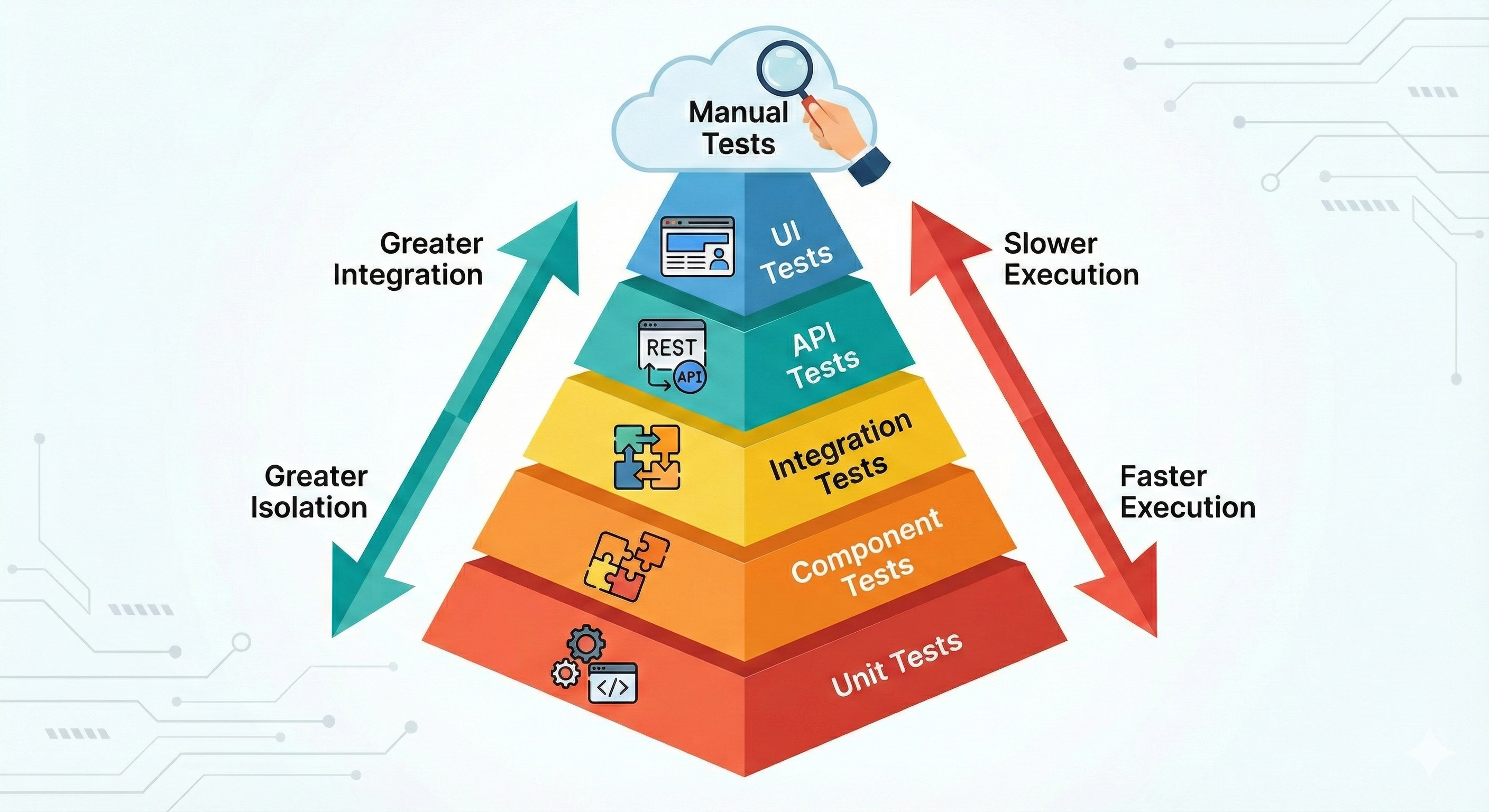
Automating Unit & Integration tests, and
The “Manual Audit” to ensure your vibe matches reality.
Welcome👋🏻
I’ve decided to start this Vibe Coding series to share my perspective as a software engineer. My goal is to close the gap between the technical and the non-technical, making these concepts accessible to everyone, regardless of their background.
Enjoy the Part 4 of a 5 part series!
What Is Vibe Rot? (And Why Your AI App Is Probably Broken)
There is a specific feeling in vibe coding: You ask the AI to add a “Delete” button. It adds the button. It looks beautiful. You click it, and the item disappears from the screen. Success!
But then you refresh the page, and the item is back.
The AI updated the UI (user interface), but it forgot to update the Database (backend). This is “Vibe Rot.” Because you didn’t write the code yourself, you don’t actually know if it works; you only know that it looks like it works.
To build professional software, you have to move from “I hope this works” to “I have proof this works.”
Unit Tests for Vibe Coding: How to Make the AI Prove It Works
A Unit Test checks one tiny piece of logic in isolation (like a calculator function or a currency formatter). When you’re vibe coding, the AI loves to take shortcuts. Unit tests force it to be honest.
The Practical Workflow: Before you let the AI write a complex function, tell it to write the test first:
I need a function that calculates the discount for my shopping cart.
Before you write the function, write the unit tests that checks for:
1) A standard 10% discount,
2) A case where the cart is empty, and
3) A case where the discount code is expired.
Only after the tests are written, write the function code.
Integration Tests: Catching the Bugs Your Unit Tests Miss
While unit tests check the parts, Integration Tests check how those parts work together. This is where most vibe-coded apps fail: the “Delete” button looks fine, but the connection to the database is broken.
The Practical Workflow: Ask the AI to write a “happy path” integration test:
Write an integration test that simulates a user logging in, adding an item to the cart,
and checking out. Ensure the database updates correctly at the end. If it fails,
explain why the connection between the Auth and the Database is breaking.
By making the AI run these tests, you aren’t just checking code; you’re checking the whole system.
The Manual Audit: Your Personal QA Checklist for Vibe-Coded Apps
Even with 100% test coverage, AI can still “hallucinate” success. You must be your own QA lead.
The “Skeptic’s Rule”: Every time you add a feature, try to break it in three ways:
The “Refresh” Test: Do the changes persist after a page reload?
The “Empty State” Test: What happens if there is no data to show?
The “Bad Input” Test: What happens if you type letters into a number field or leave a required field blank?
Practical Tip: Once a week, do a “Clean Run.” Open your website in an Incognito window and go through your entire user flow from scratch. You will be surprised at how many “vibes” only work because of old data sitting in your browser cache.
Breaking the AI Loop of Doom: When Your Chatbot Keeps Failing
We’ve all been there. The AI makes a mistake. You tell it to fix it. It tries, but it fails again. Three prompts later, it’s suggesting the exact same “fix” it tried at the beginning.
This happens because the AI is stuck in a loop of its own previous context:

How to break it:
The Git Reset: Revert to your last working commit:
The “Explain the Error” Prompt: Instead of asking for a fix, ask for an analysis:
Stop trying to fix the code. Explain to me in plain English exactly WHY this error
is happening. What is the conflict between File A and File B?
Be Precise: Once the AI explains the logic error, then give it the instruction to fix just that specific piece.

You're the Lead Auditor: Why Human Oversight Still Matters in Vibe Coding
We call this “test driven vibing” but in reality, it is Quality Assurance. The AI is the builder; you are the building inspector. If you don’t check the plumbing before you close the walls, you’re going to have a leak later.
By using TDV, you’re not just building faster; you’re building permanently. You’re ensuring that the “vibe” isn’t just a surface-level feeling, but a structural reality.
The Pause and Pivot: You are building the evidence you need to eventually launch your project to real users without fear.
See you in Part 5!
PS: I’ve been refining these 'vibe' workflows over 10 years in engineering. You can find more about my journey and other AI experiments on m About page.
I really like the way you explain complex things simplisticly. I’ve read a few of your posts, and they really help my learning process.
Keep up the good work and I need to go to the first post in this series and start there ;)